
TL;DR, Quick Answer
10 min readTo post to social media from Hermes Agent, run hermes plugins install adaptlypost and hermes plugins enable adaptlypost, start a new session and sign in with your AdaptlyPost account in the browser window that opens. The plugin connects Hermes to the AdaptlyPost MCP server at mcp.adaptlypost.com with OAuth, so there is no API key to paste. Hermes then drafts, schedules and publishes posts on 14 platforms, reads analytics and answers your inbox, and it asks you before every tool that changes something.
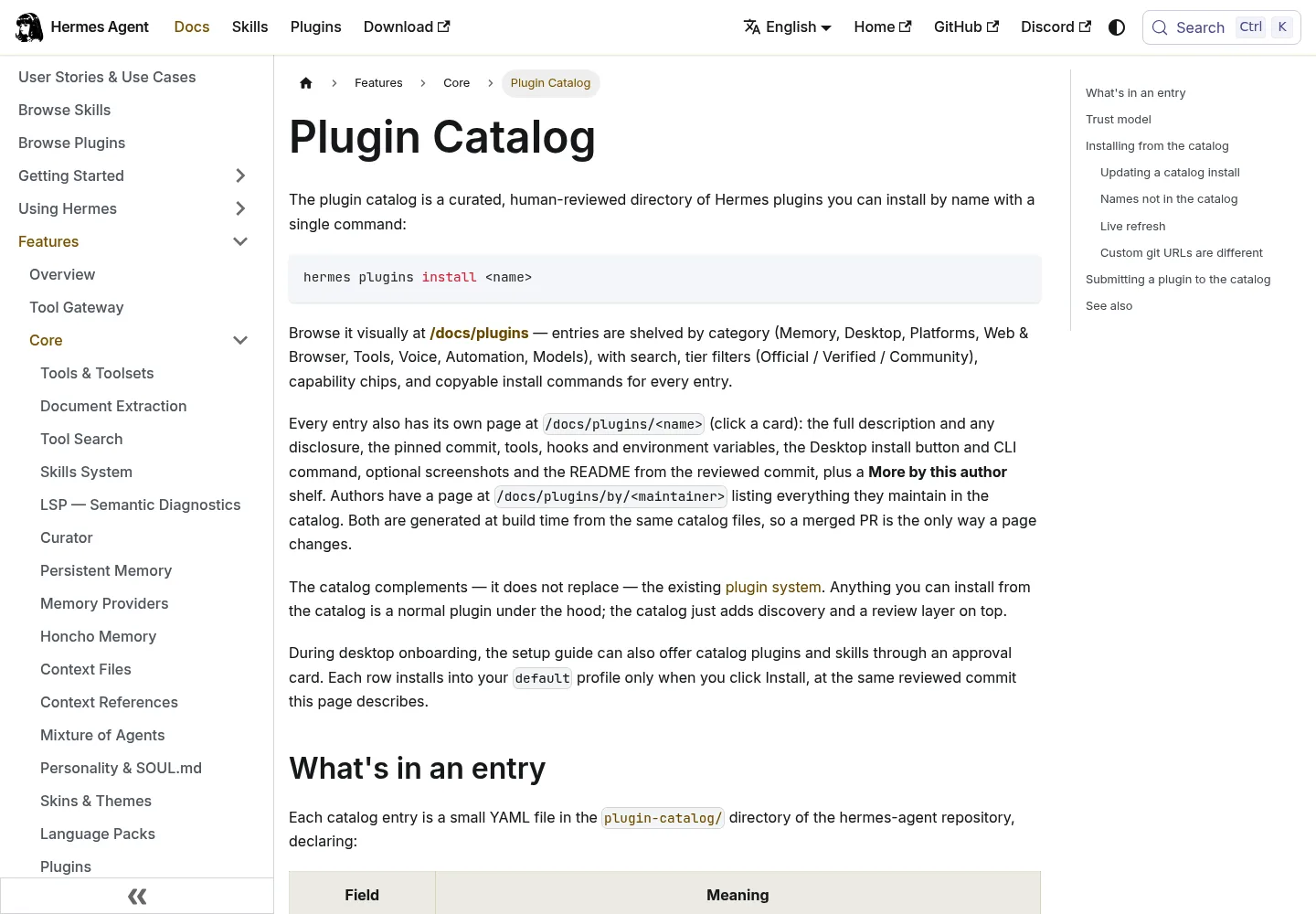
Setting up Hermes Agent social media posting takes two terminal commands and one browser sign-in with the AdaptlyPost plugin from the Hermes plugin catalog. After that, Hermes drafts, schedules and publishes posts on the accounts you connected in AdaptlyPost, and it stops to ask you before anything goes out.
Hermes Agent, the agent from Nous Research, runs in your terminal and can run scheduled cron tasks. What it lacks out of the box is a safe way to reach Instagram, LinkedIn or TikTok without you handing it fourteen sets of platform credentials. The AdaptlyPost plugin fills that gap. AdaptlyPost holds the platform connections, Hermes talks to AdaptlyPost, and you approve every write.
The short version: connect your social accounts at adaptlypost.com, run hermes plugins install adaptlypost and hermes plugins enable adaptlypost, start a new Hermes session and sign in when the browser opens. Then ask Hermes to list your connected accounts. If it lists them, ask for a draft. Hermes asks for your approval before it schedules, publishes or deletes anything.
What is the AdaptlyPost plugin for Hermes Agent?
The AdaptlyPost plugin is a reviewed entry in the Hermes plugin catalog, listed in the Hermes Marketplace, that connects Hermes Agent to the AdaptlyPost MCP server at https://mcp.adaptlypost.com/mcp. The package holds three things: a plugin.json manifest, an mcp.json server config and one skill that teaches Hermes the AdaptlyPost posting workflow. It ships no code of its own.
The server is the same one Claude, ChatGPT and Cursor use, so a post drafted in Hermes shows up on your AdaptlyPost calendar next to posts from the web app or any other client. AdaptlyPost lists the Hermes plugin on the AI agents page and on the AI agents tab of API & AI Agents in the app.
Hermes never sees a platform password or token. AdaptlyPost keeps the OAuth connections to each social network and publishes the post when Hermes asks.
What do you need before you install it?
You need Hermes Agent 0.21.6 or newer, Node.js 20.18.1 or newer with npx on your PATH, and an AdaptlyPost account with at least one social account connected. You connect the social accounts in AdaptlyPost, not in Hermes. Your AdaptlyPost plan has to include API access, because every tool call answers subscription_required without it.
The Node.js requirement is easy to miss. The plugin runs a small sign-in bridge, mcp-remote, through npx, so a Hermes install with no Node on the machine fails at the sign-in step.

How do you install the AdaptlyPost plugin in Hermes Agent?
You install AdaptlyPost by name from the Hermes plugin catalog and sign in once in your browser:
- Run
hermes plugins install adaptlypost. Hermes shows the entry's capability summary before it clones anything, then checks out the exact commit the catalog reviewed. - Run
hermes plugins enable adaptlypost. Installing puts the plugin on disk, and enabling is what makes Hermes load it. In a terminal, the install step also asks "Enable now?", so answering yes covers both. - Start a new Hermes session. The first time the server starts, your browser opens the AdaptlyPost sign-in page.
- Sign in with the email you use on AdaptlyPost and approve access.
- Ask Hermes: "List my connected social accounts."
hermes plugins install adaptlypost
hermes plugins enable adaptlypost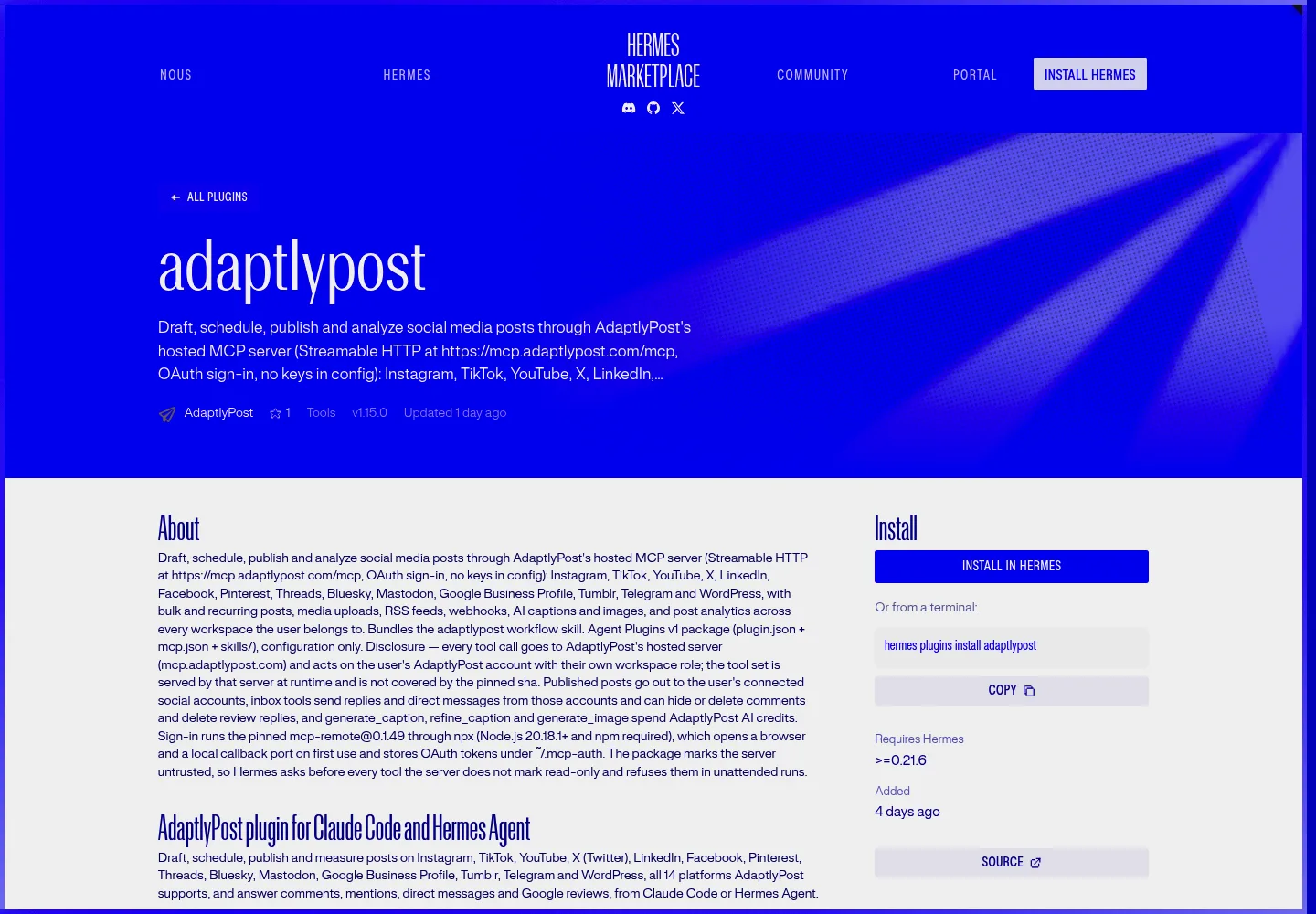
The token is kept and refreshed, so you sign in once. If the tools do not show up after you sign in, run /reload-mcp in the session.
You can also install straight from GitHub with hermes plugins install adaptlypost/claude-plugin --no-enable, then hermes plugins enable adaptlypost. The catalog route is the one to pick, because it installs the commit a human reviewed.
What does the plugin install on your machine?
The AdaptlyPost plugin installs a config, not a program. mcp.json runs the pinned mcp-remote@0.1.49 through npx, which downloads it from npm on first use, opens a local callback port for the sign-in and stores the OAuth tokens in ~/.mcp-auth. The package sends no telemetry.
The catalog pins a 40-character commit, and installs check out that pin rather than a branch tip. One thing the pin does not cover: the tool list. AdaptlyPost's server decides the tool set at runtime, so a new tool on the server reaches Hermes without a new catalog review. The listing says so in its disclosure, and so does the plugin's README.

AdaptlyPost
Start Your 7-Day Free Trial
All-platform analytics
Social Inbox
AI-powered assistant
What can Hermes Agent do on social media through AdaptlyPost?
Hermes Agent gets 80 AdaptlyPost tools through the plugin, covering posts, media, analytics, the inbox, RSS feeds and webhooks on 14 platforms: Instagram, TikTok, YouTube, X, LinkedIn, Facebook, Pinterest, Threads, Bluesky, Mastodon, Google Business Profile, Tumblr, Telegram and WordPress. Here is what that looks like by task:
- Posts and drafts. Publish now, schedule, or save a draft with a planned date. Edit, unschedule or delete a post that has not gone out. Deleting never removes a post that is already live.
- Checks before posting.
validate_postdry-runs a post and lists every problem per account without creating anything. - Bulk and recurring posts. Schedule up to 100 posts in one call, or repeat a post daily, weekly, monthly or yearly.
- Media. Upload images, videos and documents from public links, or get presigned upload URLs for large files.
- Results and retries. Read the result on each platform, with the error, and retry only the platforms that failed.
- Analytics. Views, likes, comments, shares, followers and engagement rate by period, platform or post.
- Inbox. Read and answer comments, mentions, direct messages and Google Business Profile reviews.
- RSS feeds and webhooks. Turn new feed items into drafts or posts, and send post and inbox events to your own endpoint.
- AI captions and images. Write or rewrite a caption to a platform's length, or generate an image. A caption costs 2 AdaptlyPost AI credits, an image 2 or 4.
Analytics cover Facebook, Instagram, Threads, TikTok, Pinterest, Bluesky, LinkedIn, YouTube, X and Google Business Profile, and Google Business Profile reports location impressions only. TikTok and X have no inbox in AdaptlyPost.

Which Hermes Agent MCP tools ask for approval?
Hermes Agent asks for your approval before every AdaptlyPost tool that the server does not mark read-only, because the plugin's plugin.json marks the server untrusted. Creating, scheduling, publishing and deleting posts, inbox replies and messages, removing accounts, connect links, webhooks and AI generation all stop for a yes. Reading accounts, posts and analytics runs without a prompt.
Hermes also refuses those write tools in cron jobs and other unattended runs. A scheduled Hermes task can read your analytics at 7am, but it cannot publish at 7am with nobody watching. I like that default. An agent that posts on a timer to your company's LinkedIn is the kind of thing you want to turn on deliberately, not by accident.
Your workspace role is the second limit, because Hermes acts as you. An Admin or Editor can schedule and publish. A Contributor can save and edit their own drafts, upload media and generate captions, but cannot schedule or publish. A Viewer can only read. When a role refuses a schedule, the skill tells Hermes to save the post as a draft for someone with publish rights.
What prompts can you try first?
These prompts come from the plugin's own README. Under each is what Hermes does in AdaptlyPost.
"List my connected social accounts"
Hermes shows each account with its platform and status. An account marked unauthorized needs reconnecting in AdaptlyPost before it can post. If this prompt works, the sign-in works.
"Schedule this announcement on LinkedIn and X for tomorrow at 9am, with a shorter version for X"
Hermes writes one caption for LinkedIn and a separate one within X's 280 characters, then shows you both captions, both accounts and the time with its timezone. Saving the draft and scheduling it are both writes, so Hermes asks for your approval at each step. After the second yes, the post sits on your AdaptlyPost calendar as scheduled.
"Turn https://example.com/blog/launch into posts for Instagram, Threads and Bluesky and save them as drafts"
Hermes reads the page, writes a version per network and asks before it saves each draft. Drafts publish nothing. You or a teammate finish them on the AdaptlyPost calendar, or ask Hermes to publish them later.
"Which platforms failed on yesterday's post? Retry only those"
Hermes reads the result on each platform, shows the error for any that failed and asks before it retries. AdaptlyPost sends only the failed platforms again, with the same content.
"What were my five best posts last month by engagement, and on which platforms?"
Hermes lists your top posts for the window by one metric. This is a read, so it runs without an approval prompt.
"Draft friendly replies to the unanswered Instagram comments on yesterday's post, and send them once I approve"
Hermes reads the comments, drafts a reply to each and shows you the text next to the comment it answers. Nothing reaches a real person until you approve.
How do you run Hermes Agent headless with an API key?
On a server or any machine without a browser, skip the plugin and add the AdaptlyPost MCP server to ~/.hermes/config.yaml with an API key. The OAuth sign-in needs a browser window, and a headless box has none.
AdaptlyPost
Start Your 7-Day Free Trial
All-platform analytics
Social Inbox
AI-powered assistant
mcp_servers:
  adaptlypost:
    url: 'https://mcp.adaptlypost.com/mcp'
    headers:
      Authorization: 'Bearer ${ADAPTLYPOST_API_KEY}'
Create the key on the API & AI Agents page and put ADAPTLYPOST_API_KEY=... in ~/.hermes/.env. The key works like a password for your AdaptlyPost account, so keep it out of chats. The authentication docs cover how keys and roles work.
This route skips the plugin, so it also skips the plugin's skill and the untrusted setting in its plugin.json. An API key carries the role of the member who created it, so for a headless agent that should never publish on its own, create the key as a Contributor. A Contributor key cannot schedule or publish, whatever the agent decides to do at 3am.
What do people build with Hermes and AdaptlyPost?
AdaptlyPost customers use Hermes for content pipelines where the agent prepares posts and a person approves them. One reviewer uses Hermes Agent to make YouTube content and wrote that they got their agent posting videos through the AdaptlyPost MCP server "up and running in less than 10 minutes". Another connected AdaptlyPost to Hermes, Codex and Claude in a system of nine agents and automations and scheduled 50 posts in one week: "My agents handle the planning and content preparation, I review and approve, and AdaptlyPost handles the scheduling and publishing."
That second setup is the pattern the plugin's approval prompts are built for. The agents do the volume, and a person still says yes to what goes out under the brand's name.
When should you use Claude Code, ChatGPT, Zapier or n8n instead?
Use Hermes when you already live in it. If you work in Claude Code, ChatGPT, Cursor or Gemini CLI, connect the same server from there; the setup for each client is in how to post to social media with AI agents, and ChatGPT has its own listed plugin, covered in how to schedule social media posts from ChatGPT. The best social media MCP servers compares AdaptlyPost with other schedulers that ship one.
If you want posts to come from a workflow instead of a conversation, use an automation tool. Zapier turns sheet rows and form answers into scheduled posts, as the Zapier social media automation guide shows, and the AdaptlyPost community node does the same in n8n, covered in the n8n social media automation guide.
Frequently Asked Questions
Can Hermes Agent post to social media?
Hermes Agent posts to social media through the AdaptlyPost plugin from the Hermes plugin catalog. Install it with hermes plugins install adaptlypost, enable it, and sign in with your AdaptlyPost account. Hermes then drafts, schedules and publishes on Instagram, TikTok, YouTube, X, LinkedIn, Facebook, Pinterest, Threads, Bluesky, Mastodon, Google Business Profile, Tumblr, Telegram and WordPress, and asks for approval before each write.
Do I need an API key to use AdaptlyPost in Hermes Agent?
The AdaptlyPost plugin for Hermes Agent needs no API key. It signs in with OAuth in your browser the first time the server starts and keeps the token refreshed. You need an API key only for a headless setup, where you add the server to ~/.hermes/config.yaml with a key from the API & AI Agents page.
Which Hermes Agent version does the AdaptlyPost plugin need?
The AdaptlyPost plugin needs Hermes Agent 0.21.6 or newer and Node.js 20.18.1 or newer with npx on your PATH. Node.js runs mcp-remote, the bridge that handles the sign-in and talks to the AdaptlyPost MCP server.
Will Hermes Agent publish a post without asking me?
Hermes Agent does not publish through AdaptlyPost without asking. The plugin marks the AdaptlyPost server untrusted, so Hermes asks before every tool that creates, schedules, publishes or deletes, and refuses those tools in cron and other unattended runs. Read-only tools, such as listing accounts and reading analytics, run without a prompt.
Can Hermes Agent schedule social media posts from a cron job?
A Hermes cron job cannot schedule or publish through the AdaptlyPost plugin, because Hermes refuses write tools from an untrusted server in unattended runs. A cron job can read posts and analytics. If you set up the headless API key route for an unattended agent, create the key as a Contributor so the agent cannot schedule or publish.
Where does the plugin store my AdaptlyPost sign-in?
The AdaptlyPost plugin stores its OAuth tokens in ~/.mcp-auth on your machine. The mcp-remote bridge writes them there after you sign in and refreshes them, so you sign in once. The package sends no telemetry.
Why don't the AdaptlyPost tools show up in Hermes after I sign in?
Run /reload-mcp in the Hermes session if the AdaptlyPost tools are missing after the browser sign-in. Also check that the plugin is enabled, since hermes plugins install puts it on disk and hermes plugins enable adaptlypost makes Hermes load it.
Can Hermes Agent answer comments and DMs through AdaptlyPost?
Hermes Agent answers comments, mentions, direct messages and Google Business Profile reviews through the AdaptlyPost inbox tools. Comments work on Facebook, Instagram, Threads, YouTube, Bluesky, Mastodon and LinkedIn, and direct messages on Facebook, Instagram, Bluesky and Mastodon. Hermes asks before each reply, and replying needs an Admin or Editor role.
Which social platforms can Hermes Agent post to?
Hermes Agent posts to 14 platforms through the AdaptlyPost plugin: Instagram, TikTok, YouTube, X, LinkedIn, Facebook, Pinterest, Threads, Bluesky, Mastodon, Google Business Profile, Tumblr, Telegram and WordPress. You connect the accounts in AdaptlyPost, not in Hermes. Analytics cover ten of those platforms, and TikTok and X have no inbox in AdaptlyPost.
AdaptlyPost
Start Your 7-Day Free Trial
All-platform analytics
Social Inbox
AI-powered assistant
Can Hermes Agent use AdaptlyPost on a server without a browser?
Hermes Agent works on a headless server if you skip the plugin and add the AdaptlyPost MCP server to ~/.hermes/config.yaml with an API key, because the OAuth sign-in needs a browser window. Put ADAPTLYPOST_API_KEY in ~/.hermes/.env. The key carries the role of the member who created it, so create it as a Contributor if the agent should never schedule or publish.
Put this into practice with AdaptlyPost
Was This Article Helpful?
Let us know what you think!
See us more often in Google
One click marks AdaptlyPost as a preferred source, so our articles sit higher in your Top Stories, AI Mode, and AI Overviews.
Before you go...
AdaptlyPost
Schedule your content across all platforms
Manage all your social media accounts in one place with AdaptlyPost.
All-platform analytics
Social Inbox
AI-powered assistant
Related Articles
How to Schedule Social Media Posts From ChatGPT With the AdaptlyPost Plugin
Schedule social media posts from ChatGPT on 11 networks: install the AdaptlyPost plugin, sign in once, and confirm each post before it goes out.
How to Set Up n8n Social Media Automation With AdaptlyPost
Set up n8n social media automation with the AdaptlyPost node: one token, 14 platforms, a pre-publish check, weekly analytics and alerts when a post fails.
How to Post to Social Media With AI Agents in Under 5 Minutes
A step-by-step guide on how to post to social media with AI agents: connect accounts once, give Claude, ChatGPT, Cursor or a script one key, and publish to fourteen platforms through MCP, an agent skill, or REST.