
TL;DR, Quick Answer
7 min readTo post to social media with AI agents, connect your accounts to AdaptlyPost once, create an adaptly_ API key, and hand that key to the agent through one of three doors: the hosted MCP server at mcp.adaptlypost.com for Claude, ChatGPT and Cursor, the npx skills add adaptlypost/agent command for coding agents, or the REST endpoint POST /social-posts for scripts. The agent then publishes or schedules to X, LinkedIn, Instagram, Facebook, TikTok, YouTube, Pinterest, Threads, Bluesky and Mastodon.
Learning how to post to social media with AI agents takes less time than writing this week's captions by hand. The agent never touches a platform password. It talks to a scheduler that already holds the OAuth connections, and the scheduler talks to Instagram, TikTok and the rest. One key, one config block, and Claude or ChatGPT can publish to twelve networks.
This guide uses AdaptlyPost because we build it and because it exposes all three routes an agent can take: a hosted MCP server, an installable agent skill, and a plain REST API. The steps are the same shape on any scheduler that has an MCP server, and we list those in the best social media MCP servers.
The short version: connect accounts at adaptlypost.com, create a key on the API & AI Agents page, paste the MCP config into Claude Code, Cursor or claude.ai, then ask the agent to list your accounts. If it lists them, ask it to schedule a post. Total time is about five minutes, and the first two steps only happen once.
What do you need before an AI agent can post?
An AI agent needs three things before it can post: a scheduler account with at least one social profile connected, an API key, and an agent client that supports MCP, agent skills, or plain HTTP. Nothing else. No platform developer app, no Meta review, no TikTok API application.
The scheduler is what removes those. AdaptlyPost already holds approved developer apps for X, LinkedIn, Instagram, Facebook, TikTok, YouTube, Pinterest, Threads, Bluesky and Mastodon, so when you connect an account through OAuth the platform trusts AdaptlyPost, and the agent inherits that trust through the key.
Step 1: Connect your social accounts once
Connect each social account to AdaptlyPost on the Connected Accounts page. Every connection is an OAuth login on the platform's own screen, and the platform hands AdaptlyPost a token. Your password never enters AdaptlyPost and never reaches the agent.
Two platform rules matter here. Instagram requires a Business or Creator account, because Meta only issues publishing tokens to those. TikTok requires the account to accept the content posting permission on the TikTok consent screen. Both are one-time steps, and both are done in the browser, not by the agent.
The 7-day trial starts on signup and includes every platform, so connecting all ten to test costs nothing.
Step 2: Create an API key for the agent
Create the key at Manage, API & AI Agents, or go straight to adaptlypost.com/api-tokens. Give it a name that says which agent will use it, such as claude-code-laptop, and copy the value once. Every key starts with adaptly_.
One key per agent is the right habit. When a laptop is lost or a script is retired, the Revoke button on the same page cuts that agent off without touching the others. The key works for all three routes below, so you never need more than one per agent even if it uses MCP and REST at once.
Step 3: Give the key to your agent
Give the key to the agent through whichever of the three routes matches where it runs. Chat agents take MCP. Coding agents take the skill. Scripts and workflow tools take REST.
Route A: MCP for Claude, ChatGPT, Cursor and Windsurf
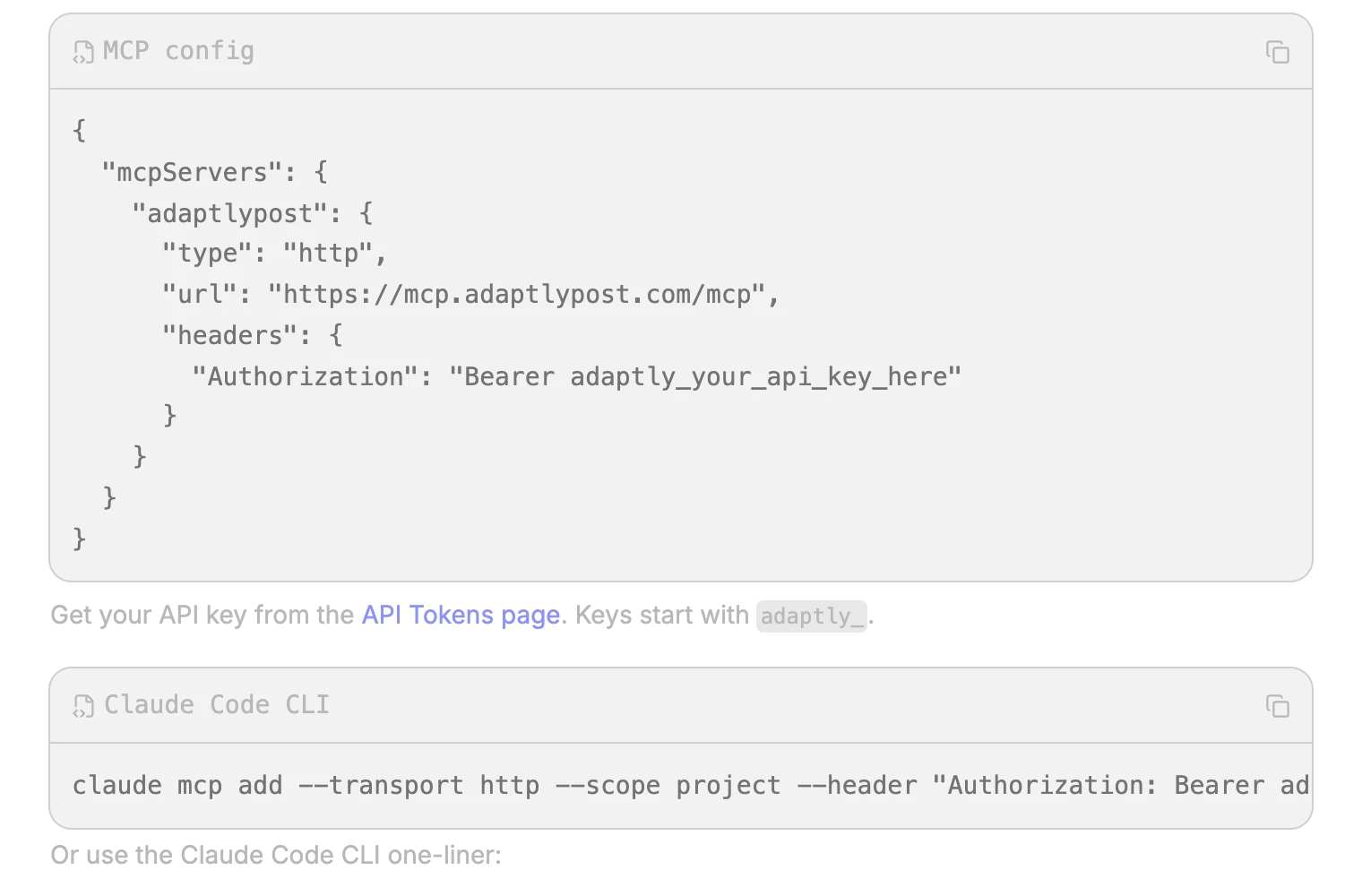
The AdaptlyPost MCP server runs at https://mcp.adaptlypost.com/mcp over HTTP transport and needs one header. In Claude Code, it is a single command:
claude mcp add --transport http --scope project \
  --header "Authorization: Bearer adaptly_your_key" \
  -- adaptlypost https://mcp.adaptlypost.com/mcp
Cursor and Windsurf take the same server as JSON in their MCP settings file, .cursor/mcp.json for Cursor:
{
  "mcpServers": {
    "adaptlypost": {
      "type": "http",
      "url": "https://mcp.adaptlypost.com/mcp",
      "headers": {
        "Authorization": "Bearer adaptly_your_key"
      }
    }
  }
}
Claude Desktop only speaks stdio, so it reaches HTTP servers through the mcp-remote bridge in claude_desktop_config.json. In claude.ai and ChatGPT, add the URL as a custom connector under Settings, Connectors. The exact blocks for each client are in the MCP setup guide.
Once connected, the agent sees 31 tools: list workspaces and accounts, upload media (including an in-chat upload box in ChatGPT and Claude), create, get, list, update, delete, unschedule and bulk schedule posts, publish drafts, list post results, retry failed platforms, manage recurring series, read analytics, and generate captions and images.

AdaptlyPost
Start Your 7-Day Free Trial
All-platform analytics
Social Inbox
AI-powered assistant
Route B: The agent skill for Claude Code, Cursor, Windsurf and Codex
Coding agents that support agent skills install AdaptlyPost with one command and no MCP configuration:
npx skills add adaptlypost/agentThe skill documents the REST endpoints for the agent, so the adaptly_ key is the only thing the agent still needs from you. This is the route the OpenClaw skill and the Grok bot template use under the hood.
Route C: REST for scripts, n8n, Make and cron
Any HTTP client posts with one call to https://post.adaptlypost.com/post/api/v1/social-posts:
curl -X POST https://post.adaptlypost.com/post/api/v1/social-posts \
  -H "Authorization: Bearer $ADAPTLY_API_KEY" \
  -H "Content-Type: application/json" \
  -d '{
    "platforms": ["LINKEDIN", "TWITTER"],
    "contentType": "TEXT",
    "text": "Shipping notes for the week are up.",
    "linkedinConnectionIds": ["<id from /social-accounts>"],
    "twitterConnectionIds": ["<id from /social-accounts>"],
    "scheduledAt": "2026-09-08T09:00:00",
    "timezone": "Europe/Berlin"
  }'
The OpenAPI 3.0.3 spec at /openapi.json imports into n8n, Make and Postman, and the quick start walks through the first three calls. Omit scheduledAt to publish now, or set saveAsDraft to true and call the publish endpoint later. platforms, contentType and timezone are the only required fields.
Step 4: Ask the agent to list accounts, then to post
Ask the agent to list connected accounts before asking it to post. In Claude Code that is literally "list my AdaptlyPost accounts." If the twelve platforms and their usernames come back, the key and the transport both work. If nothing comes back, the header is wrong or the key was revoked, and no post has gone out.
Then give a real instruction with a platform, a time and a timezone:
Schedule "New API docs are live, link in the first comment" to LinkedIn and X on Tuesday at 9:00 Europe/Berlin, and attach the image at https://example.com/docs.png.
The agent calls upload_media, then create_post with both platforms, and reports the post ID. Ask it to "check results for that post" and it calls list_post_results, which returns one line per platform. If X accepted and LinkedIn failed on an image size rule, the agent sees exactly that, and retry_failed_platforms re-sends only LinkedIn.
How do you keep an AI agent from posting something wrong?
Keep an AI agent from posting something wrong by running it in draft mode first, reviewing per-platform results, and scoping the key to one agent. AdaptlyPost supports all three without extra configuration.
- Drafts first. Tell the agent to create posts as drafts for the first week. Drafts sit in the AdaptlyPost calendar where a person reviews and publishes them, and
publish_draftis a separate tool the agent only calls when told to. - Read the results.
list_post_resultsand thepost.partially_failedwebhook say which platform rejected what. An agent that reads them does not report success on a failed TikTok upload. - One key per agent. Revoke a key on the API & AI Agents page and only that agent stops. Never share one key across a laptop, a server and a chat client.
- Webhooks for the record. Register one webhook URL and AdaptlyPost sends
post.published,post.scheduled,post.partially_failedandpost.failedfor every post, whichever route created it, plusaccount.unauthorizedwhen a connected account's token stops working. Setup is on the webhooks page.
Which AI agents can post to social media this way?
Claude Code, Claude Desktop, claude.ai, ChatGPT, Cursor, Windsurf, Codex, OpenClaw and Grok Bot can each post to social media through AdaptlyPost, plus any framework that makes HTTP calls. The table shows the route for each.
| Agent or client | Route | Setup |
|---|---|---|
| Claude Code | MCP or skill | claude mcp add one-liner, or npx skills add adaptlypost/agent |
| Claude Desktop | MCP via mcp-remote | JSON block in claude_desktop_config.json |
| claude.ai, ChatGPT | MCP | Custom connector with the server URL |
| Cursor, Windsurf | MCP or skill | .cursor/mcp.json, or the skill command |
| Codex | Skill | npx skills add adaptlypost/agent |
| OpenClaw | Skill | The OpenClaw skill |
| Grok Bot | Template | The x.ai template |
| n8n, Make, Python, cron | REST | OpenAPI import or a bearer-token POST |
If the agent you use is not on this list and it can call an HTTP endpoint, it takes Route C. If it can load an MCP server, it takes Route A. There is no fourth case.
For a comparison of schedulers that offer these routes, read the best social media tools for AI agents, and for REST-only options see the best social media scheduling API. The background on the protocol itself is in social media management with MCP.
Frequently Asked Questions
Can an AI agent post to social media automatically?
An AI agent can post to social media automatically by calling a scheduler's MCP server or REST API with a bearer key, and AdaptlyPost supports both on every plan from $19 per month. The agent creates the post, sets a schedule with a timezone, and reads per-platform results, all without a browser. Connecting the social accounts is the only step a person does by hand.
What is an MCP server for social media?
An MCP server for social media is a hosted service that publishes posting tools, such as create_post and list_accounts, over the Model Context Protocol so that Claude, ChatGPT or Cursor can call them. AdaptlyPost's server runs at mcp.adaptlypost.com with 31 tools and connects with one URL and one header. The client discovers the tools on its own, so no code is written.
Which platforms can AI agents post to through AdaptlyPost?
AI agents post to twelve platforms through AdaptlyPost: X, LinkedIn, Instagram, Facebook, TikTok, YouTube, Pinterest, Threads, Bluesky, Mastodon, Google Business Profile and Tumblr. One create_post call fans out to any combination, and list_post_results returns one result per platform. Instagram needs a Business or Creator account and TikTok needs the content posting permission accepted during connection.
AdaptlyPost
Start Your 7-Day Free Trial
All-platform analytics
Social Inbox
AI-powered assistant
Is it safe to let an AI agent post for me?
Letting an AI agent post is safe when it holds a scoped key instead of a password, starts in draft mode, and reads results before reporting success. AdaptlyPost keys are created and revoked per agent on the API & AI Agents page, drafts wait for a person in the calendar, and the post.failed webhook flags anything that did not go out. Run draft-only for a week, then let it publish.
Does an AI agent need a developer account on each platform?
An AI agent does not need a developer account on any platform when it posts through AdaptlyPost, because AdaptlyPost holds the approved apps for all twelve networks. Connecting an account is a normal OAuth login, and the agent uses the AdaptlyPost key from then on. Posting directly to platform APIs would require your own Meta, TikTok, X, LinkedIn, YouTube and Pinterest apps and their review processes.
Put this into practice with AdaptlyPost
Was This Article Helpful?
Let us know what you think!
See us more often in Google
One click marks AdaptlyPost as a preferred source, so our articles sit higher in your Top Stories, AI Mode, and AI Overviews.
Before you go...
AdaptlyPost
Schedule your content across all platforms
Manage all your social media accounts in one place with AdaptlyPost.
All-platform analytics
Social Inbox
AI-powered assistant
Related Articles
The 7 Best Social Media MCP Servers for Posting From Claude, ChatGPT and Cursor
Seven best social media MCP servers compared for real posting: hosted URL, auth, tool count, platforms, and what each plan costs. Includes the setup config for Claude Code and Claude Desktop.
How to Set Up a Manus Cue Connector for Social Media Posting
Cue agents get their own email and phone, so a Manus Cue connector for social media posting starts with drafts. Server URL, Bearer token, first call.
How to Set Up an OpenAI dots Plugin for Social Media Posting
Setting up an OpenAI dots plugin for social media posting takes a custom MCP URL, an OAuth sign-in and a read-only test. What ChatGPT Pro blocks.