
TL;DR, Quick Answer
9 min readTo schedule social media posts from ChatGPT, install the AdaptlyPost plugin in ChatGPT, sign in with your AdaptlyPost account, and say what to post and when. ChatGPT reads your connected accounts, uploads the files you attach, writes a caption if you ask, and shows you the finished post to confirm before it schedules or publishes anything. Drafts save without a confirmation, and your workspace role decides what ChatGPT may do.
You can draft, schedule and publish social media posts from ChatGPT by telling ChatGPT what to post, where, and when. The AdaptlyPost plugin is approved and listed in ChatGPT, so there is no API key to copy. You install the plugin, sign in with your AdaptlyPost account, and ChatGPT drafts, schedules and publishes to the accounts you connected in AdaptlyPost.
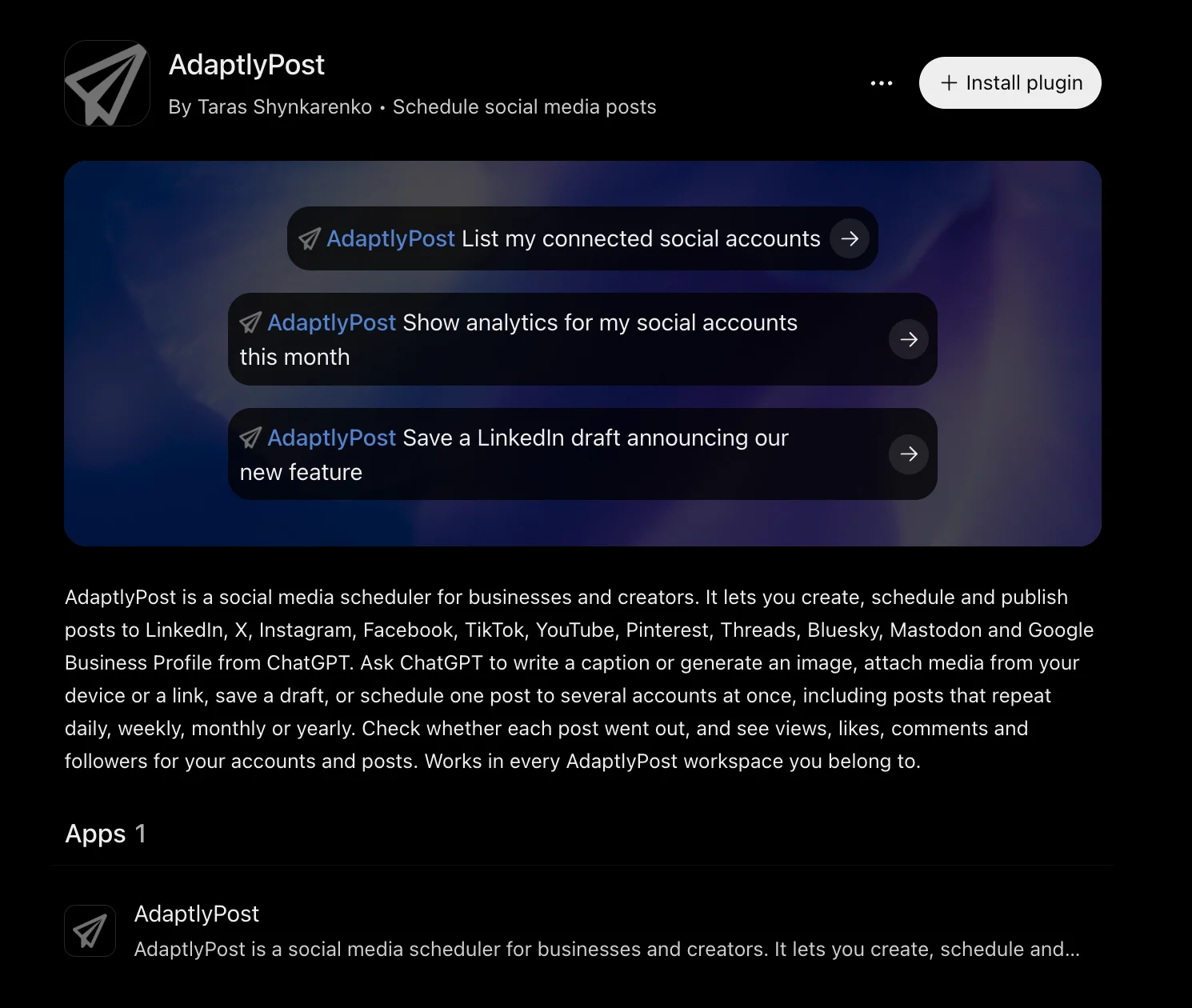
The short version: connect your social accounts at adaptlypost.com, open the AdaptlyPost plugin in ChatGPT, click "Install plugin" and sign in. Then ask ChatGPT to list your accounts. If it lists them, attach a photo and ask for a scheduled post. ChatGPT shows you the post and waits for your confirmation before anything is scheduled or published.
What is the AdaptlyPost plugin in ChatGPT?
The AdaptlyPost plugin turns ChatGPT into an AI agent for your AdaptlyPost account. It works with your connected social accounts, your posts and calendar, and your analytics. In AdaptlyPost, ChatGPT is listed on the API & AI Agents page, next to the Claude connector, the Grok bot, OpenClaw and the CLI. The plugin runs on the AdaptlyPost MCP server at https://mcp.adaptlypost.com/mcp, the same server Claude and Cursor use.
AdaptlyPost holds the connections to the social networks, so ChatGPT never sees a platform password or token. ChatGPT sends the post to AdaptlyPost, and AdaptlyPost publishes it at the time you asked.
Before the listing, ChatGPT users had to add the server by hand in developer mode. The listed plugin skips that, and the OpenAI dots plugin guide shows how an always-on dot uses it.
What do you need before you start?
You need a ChatGPT account and an AdaptlyPost account with at least one social account connected. You connect social accounts in AdaptlyPost, not in ChatGPT, by logging in on each platform's own screen. Instagram needs a Business or Creator account, and TikTok asks you to accept the content posting permission. The 7-day AdaptlyPost trial includes every platform.
How do you add AdaptlyPost to ChatGPT?
You install AdaptlyPost from its listing in ChatGPT and sign in once:
- Open the AdaptlyPost plugin in ChatGPT while signed in to ChatGPT.
- Click "Install plugin". ChatGPT opens the AdaptlyPost sign-in page.
- Sign in with the email you use on AdaptlyPost and allow access.
- In a new chat, ask: "List my connected social accounts."
If ChatGPT says your email has no AdaptlyPost account, disconnect the plugin and connect again with the email your AdaptlyPost account uses.
If you have several workspaces, for example one per client, name one in your message, such as "in the Acme workspace". Without a name, ChatGPT uses your current workspace.
What can ChatGPT do with the AdaptlyPost plugin?
Here is what ChatGPT can do, grouped by task:
- Posts and drafts. Publish now, schedule for a date and time in your timezone, or save a draft. Edit a draft or a scheduled post, publish a draft, move a scheduled post back to drafts, or delete a post that has not gone out. Deleting never removes a post that is already live on a network.
- Many posts at once. Schedule up to 100 posts in one request to the same accounts, each with its own text, time and media.
- Recurring posts. Repeat a post daily, weekly, monthly or yearly, then list, pause, resume or stop the series.
- Media. Upload photos, videos and documents you attach in the chat, from a public link, or through an upload box that appears in the conversation.
- Results and retries. See whether each platform published or failed, with the error, and retry only the platforms that failed.
- Analytics. Views, likes, comments, shares, followers and engagement rate, per period, platform or post.
- AI captions and images. Write a caption from a prompt, rewrite one with an instruction such as "shorter" or "add a question at the end", or generate an image to post.
- Workspaces and accounts. See the workspaces and accounts you can post to, pick a Pinterest board, and search Instagram music and sounds for a Reel.
Options from the AdaptlyPost composer work here too, such as first comments, TikTok privacy settings, LinkedIn document posts, and Google Business Profile events and offers.
The ChatGPT plugin does not connect or remove social accounts, and it does not manage RSS feeds, connect links or webhooks. Do those in AdaptlyPost.
What prompts can you try first?
Under each prompt is what ChatGPT does in AdaptlyPost. The account list, the LinkedIn draft and the analytics request are the three example prompts on the AdaptlyPost listing in ChatGPT.
"List my connected social accounts"
ChatGPT shows each account with its platform, name and status. An unauthorized account needs reconnecting in AdaptlyPost before it can post, and ChatGPT tells you so. If this prompt works, the sign-in works.

AdaptlyPost
Start Your 7-Day Free Trial
All-platform analytics
Social Inbox
AI-powered assistant

"Schedule this photo on Instagram and Facebook for Friday at 9am Berlin time, with a short caption about our spring menu"
With a photo attached, ChatGPT uploads it to AdaptlyPost, writes the caption with AdaptlyPost AI, and shows you the caption, the photo, both accounts and the time. After you confirm, the post sits on your AdaptlyPost calendar as scheduled. The caption costs 2 AI credits.
"Save a LinkedIn draft announcing our new feature"
ChatGPT saves a draft without asking for a confirmation, because a draft publishes nothing. The draft appears in your AdaptlyPost calendar, where you or a teammate can edit it. Later, "publish that draft now" or "schedule that draft for Tuesday at 10am" finishes the job, with a confirmation first.
"Post 'Office hours are open today from 4pm' to X and Threads every Monday at 8am, starting next week"
ChatGPT confirms the repeat schedule with you, then creates a weekly series. Say "pause the Monday post" to hold it or "stop the Monday post" to end it. Posts already published stay up.
"Show analytics for my social accounts this month"
ChatGPT reads this month's views, likes, comments, shares, followers and engagement rate, each compared with the period of the same length just before it. Ask "which post got the most comments?" next, and ChatGPT lists your posts sorted by comments. Mastodon has no analytics, and Google Business Profile reports location impressions only. If the numbers look old, ask ChatGPT to refresh analytics first.
How do you add photos and videos?
Attach files to your message and the plugin uploads them to AdaptlyPost. Each attachment can be up to 250 MB, with images up to 50 MB and documents up to 100 MB. JPEG, PNG, WebP, MP4 and QuickTime files work, and PDF, PowerPoint and Word files work for LinkedIn document posts.
For a file that is not in the chat, such as a video on your phone, ask ChatGPT for the upload box. You pick files from your device in the conversation, and the box hands them back to ChatGPT. ChatGPT can also upload a file from a public https link.
AdaptlyPost stores uploads at public URLs, so only upload media you mean to post. One upload can go into several posts.
Does ChatGPT publish anything without asking?
No. Before it publishes or schedules, ChatGPT shows you the final text, media, accounts and time, and waits for you to confirm. A recurring post gets the same check for its repeat schedule. Drafts are the exception. Saving a draft publishes nothing, so ChatGPT saves it without asking.
Your workspace role applies, because the plugin acts as you. An Admin or Editor can publish and schedule. A Contributor can save and edit their own drafts, upload media and generate captions, but cannot schedule or publish. When a Contributor asks ChatGPT to schedule a post, ChatGPT says the role does not allow it and offers to save a draft for an Admin or Editor to publish. A Viewer can only read.
AI captions and images spend AdaptlyPost AI credits. A caption or a rewrite costs 2 credits, a standard image 2 and a premium image 4. AdaptlyPost refunds a failed generation, and if you connected your own AI provider key in AdaptlyPost, no credits are used. AdaptlyPost also saves generated images to your AI image studio.
How do you check that a post went out?
Ask "Did my post go out on every platform?" and ChatGPT reads the result for each platform: published, still publishing, or failed with the platform's error message. Publishing runs in the background, so a post sent a moment ago may still show as publishing.
If a platform failed, fix the cause, often an expired connection or a file the platform refused, and ask ChatGPT to retry the failed platforms. AdaptlyPost sends only those again, with the same content.
TikTok has one special case. When you hit TikTok's daily posting limit, the video lands in your TikTok inbox as a draft, and ChatGPT tells you to finish it in the TikTok app.
Which platforms can you post to from ChatGPT?
You can post to eleven platforms from ChatGPT: Instagram, TikTok, YouTube, X, LinkedIn, Facebook, Pinterest, Threads, Bluesky, Mastodon and Google Business Profile. One request can go to any mix of them, and AdaptlyPost checks each platform's limits, such as caption length and carousel size, when the post is created.
AdaptlyPost
Start Your 7-Day Free Trial
All-platform analytics
Social Inbox
AI-powered assistant
AdaptlyPost also publishes to Tumblr and Telegram, but the ChatGPT plugin does not post to those two. Post to them from the AdaptlyPost web app, or from Claude or Cursor through the MCP server.
What about Claude, Cursor, Zapier and n8n?
Claude, Cursor and other MCP clients connect to the same server, and coding agents can install the AdaptlyPost agent skill. The setup for each, plus the REST API, is in how to post to social media with AI agents. Other schedulers with MCP servers are compared in the best social media MCP servers.
If you want posts to come from a workflow instead of a chat, use one of the automation integrations. Zapier creates, schedules and publishes posts from other apps, as shown in the Zapier social media automation guide, and the AdaptlyPost community node does the same inside n8n, covered in the n8n social media automation guide. The AI agents page shows the agent setups side by side.
Frequently Asked Questions
Can ChatGPT post to social media?
ChatGPT can post to social media through the AdaptlyPost plugin, which is listed in ChatGPT and signs in with your AdaptlyPost account. ChatGPT prepares the post, AdaptlyPost publishes it on your connected accounts, and ChatGPT asks for your confirmation before anything is published or scheduled.
Do I need an API key to use AdaptlyPost in ChatGPT?
You do not need an API key to use AdaptlyPost in ChatGPT. The plugin signs in with OAuth, so you log in with your AdaptlyPost account and allow access. API keys are for scripts, headless agents and clients without a sign-in flow, and you create them at adaptlypost.com/api-tokens.
Can ChatGPT schedule a post in my timezone?
ChatGPT can schedule a post in any timezone. Give the time with a city or timezone, such as "9am New York time", and the post goes out at that moment. Check the time in the confirmation before you approve it.
Can ChatGPT write social media posts for me?
ChatGPT writes social media posts for you, and the AdaptlyPost plugin schedules or publishes them on your connected accounts after you confirm. Ask for the text in the chat, or ask ChatGPT to use AdaptlyPost AI, which writes a caption to each platform's character limit for 2 AI credits. Read the post ChatGPT shows you and ask for changes before you approve it.
Where is ChatGPT listed in AdaptlyPost?
ChatGPT is listed as an AI agent on the API & AI Agents page in AdaptlyPost, next to the Claude connector, the Grok bot, OpenClaw and the CLI. The page links to the AdaptlyPost plugin in ChatGPT, where you click "Install plugin" and sign in with your AdaptlyPost account.
Can ChatGPT show analytics for my social media posts?
ChatGPT shows analytics for your social media posts through the AdaptlyPost plugin: views, likes, comments, shares, followers and engagement rate per period, platform or post. AdaptlyPost imports the last 180 days of posts when you connect an account, so ChatGPT answers questions about any date range in that history. Mastodon has no analytics, and Google Business Profile reports location impressions only.
Can ChatGPT save a draft without publishing it?
ChatGPT saves a draft through the AdaptlyPost plugin without asking for a confirmation, because a draft publishes nothing. The draft appears in your AdaptlyPost calendar, where you or a teammate can edit it. Later, ask ChatGPT to publish it or schedule it, and it asks you to confirm first.
What happens if a ChatGPT post fails on one platform?
Ask ChatGPT whether the post went out on every platform, and it shows the result for each one, with the platform's error message for any that failed. Fix the cause, often an expired connection or a file the platform refused. Then ask ChatGPT to retry the failed platforms, and AdaptlyPost sends only those again with the same content.
Does ChatGPT see my social media passwords?
ChatGPT never sees a platform password or token. AdaptlyPost holds the connections to the social networks. ChatGPT sends the post to AdaptlyPost, and AdaptlyPost publishes it at the time you asked.
Can ChatGPT post to Tumblr or Telegram?
AdaptlyPost publishes to Tumblr and Telegram, but the ChatGPT plugin does not post to those two. Post to them from the AdaptlyPost web app, or from Claude or Cursor through the MCP server.
Put this into practice with AdaptlyPost
Was This Article Helpful?
Let us know what you think!
See us more often in Google
One click marks AdaptlyPost as a preferred source, so our articles sit higher in your Top Stories, AI Mode, and AI Overviews.
Before you go...
AdaptlyPost
Schedule your content across all platforms
Manage all your social media accounts in one place with AdaptlyPost.
All-platform analytics
Social Inbox
AI-powered assistant
Related Articles
How to Post to Social Media With AI Agents in Under 5 Minutes
A step-by-step guide on how to post to social media with AI agents: connect accounts once, give Claude, ChatGPT, Cursor or a script one key, and publish to twelve platforms through MCP, an agent skill, or REST.
How to Set Up n8n Social Media Automation With AdaptlyPost
Set up n8n social media automation with the AdaptlyPost node: one token, 13 platforms, a pre-publish check, weekly analytics and alerts when a post fails.
How to Set Up a Manus Cue Connector for Social Media Posting
Cue agents get their own email and phone, so a Manus Cue connector for social media posting starts with drafts. Server URL, Bearer token, first call.