
TL;DR, Quick Answer
5 min readA Boomerang is a short, looping video format popularized by Instagram that captures a burst of photos and stitches them into a mini video that plays forward and backward. It is used for quick, engaging content in Stories and feed posts.
What Is a Boomerang?
Behind the Boomerang meaning sits a simple mechanic: roughly one second of motion played forward and then backward, on repeat. Launched as a standalone Instagram app in 2015, it now lives inside Stories and has been copied across other platforms.
Unlike a standard video, a Boomerang does not have audio and plays without pause in an endless loop, creating a hypnotic, GIF-like effect. The format captures a burst of photos in rapid succession and stitches them together to produce the looping motion.
- No audio
- Plays forward, then backward, on repeat
- Captured from a burst of photos
- Loops without pause
- Has audio
- Plays once, forward
- Captured as continuous footage
- Stops at the end
Why Boomerangs Matter for Social Media
Boomerangs occupy a unique space between photos and videos, offering distinct advantages for social media content:
- Attention-grabbing: The looping motion naturally catches the eye in a feed full of static images.
- Low effort, high impact: Creating a Boomerang takes seconds but produces content that feels more dynamic than a photo.
- Versatility: Boomerangs work for a wide range of moments, from casual behind-the-scenes glimpses to polished product showcases.
- Stories optimization: Boomerangs are perfectly suited for the quick-consumption format of Instagram Stories.
- Shareability: The short, looping nature makes Boomerangs easy to share and enjoyable to watch repeatedly.
How to Create a Boomerang
On Instagram
- Open the Instagram app and swipe to the Stories camera
- Select the Boomerang mode from the format options at the bottom of the screen
- Hold the capture button to record (the camera captures a burst of photos)
- The app automatically creates the looping video
- Apply filters, stickers, or text as desired
- Share to your Story or save to post in your feed
Boomerang Effects
Instagram offers Boomerang variations that modify the playback style:
| Effect | Description | Best For |
|---|---|---|
| Classic | Standard forward-backward loop | General use |
| SlowMo | Slowed-down loop | Dramatic or detailed movements |
| Echo | Adds a trailing motion blur effect | Artistic, dreamy content |
| Duo | Applies a glitch-style visual effect | Edgy, modern aesthetic |
On Other Platforms
While Boomerang is most associated with Instagram, similar looping video features exist elsewhere:
- Snapchat: Bounce feature creates similar looping effects
- TikTok: Loop effects can be applied to short clips
- Third-party apps: Various apps create Boomerang-style content for use on any platform
Creative Boomerang Ideas

For Personal Accounts
- Clinking glasses for a toast
- Jumping or action shots
- Hair flips or fashion moments
- Pet antics and funny expressions
- Food preparation moments (pouring, stirring, plating)
For Brand Accounts
- Product unboxing moments
- Behind-the-scenes team interactions
- Product demonstrations showing motion (spraying, applying, using)
- Event highlights and atmosphere shots
- "Before and after" reveals
For Content Creators
- Outfit change transitions
- Creative prop interactions
- Fitness movements
- Makeup application moments
- Travel highlights capturing movement
Boomerang Best Practices
Keep Movement Small and Deliberate
The best Boomerangs capture a small, defined movement rather than broad, chaotic motion. A hand toss, a wink, or a pouring motion reads better than someone running across the frame.
Stabilize Your Device
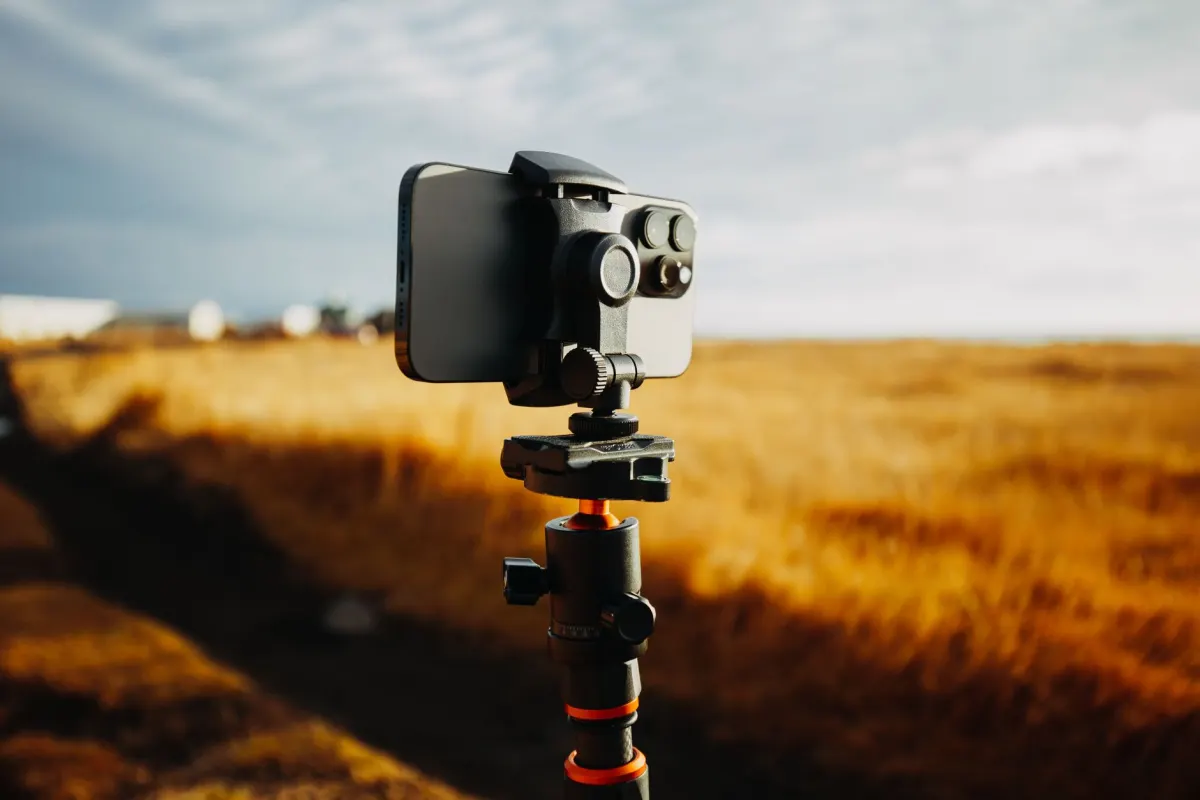
Since Boomerangs loop continuously, any camera shake is amplified and becomes distracting. Hold your phone steady or use a tripod for the cleanest result.
Mind Your Background
Busy backgrounds compete with the main motion for the viewer's attention. Simpler backgrounds let the intended movement stand out.
Light Adequately
Boomerangs captured in rapid burst mode need sufficient lighting to produce clear, sharp frames. Low-light Boomerangs appear grainy or blurry.
Consider the Loop Point
Think about how the movement will look when it reverses. Symmetrical movements (something going up and coming back down) loop more naturally than asymmetrical ones.
When to Use Boomerangs vs. Other Formats
| Content Need | Best Format |
|---|---|
| Quick fun moment | Boomerang |
| Detailed tutorial | Standard video |
| Static product showcase | Photo |
| Extended storytelling | Reel or long video |
| Quick announcement | Text-based Story |
| Dynamic action scene | Short video clip |
Frequently Asked Questions
Are Boomerangs still relevant in 2026?
Yes, though their dominance has shifted. Boomerangs remain a popular Stories format but have been somewhat overshadowed by Reels and short-form video. They continue to work well as supplementary content, particularly in Stories, event coverage, and casual behind-the-scenes moments.
What is the ideal length for a Boomerang?
Boomerangs are inherently short, typically capturing about one second of motion. This is fixed by the format itself. The key is making that one second count by choosing a clear, interesting movement.
Can I create Boomerangs outside of Instagram?
Yes. Third-party apps create Boomerang-style looping videos that you can export and use on any platform. The Boomerang concept (looping short clips) is not exclusive to Instagram even though Instagram popularized the format.

AdaptlyPost
Start Your 7-Day Free Trial
All-platform analytics
Social Inbox
AI-powered assistant
Do Boomerangs count as videos for algorithm purposes?
On Instagram, Boomerangs in Stories are treated as Story frames. When posted to the feed, they function as short video clips. The algorithmic treatment varies, but they generally receive engagement benefits associated with motion content over static images.
How do I make my Boomerangs stand out?
Focus on unexpected or satisfying movements, use good lighting, keep backgrounds clean, and add creative text or stickers that complement the motion. The most shareable Boomerangs capture a "satisfying" moment that viewers enjoy watching on loop.
When did Boomerang launch?
Instagram introduced Boomerang as its own standalone app in 2015. It now lives inside the Stories camera, and the same forward-and-backward loop has since been copied across other platforms.
Do Boomerangs include sound?
Boomerangs play without any audio. That silent, uninterrupted loop is part of what gives them their hypnotic, GIF-like feel.
Is a Boomerang basically a GIF?
Not exactly. A Boomerang is a short video built from a burst of photos that plays forward and then backward on a loop, and that construction is what gives it the hypnotic, GIF-like feel people associate with the format.
Is Snapchat's Bounce the same feature as Instagram's Boomerang?
Snapchat's Bounce produces a looping effect similar to Instagram's Boomerang, but the two features live in different apps. Bounce and TikTok's Loop effects are separate tools that each platform built to recreate the kind of looping motion Instagram made popular with Boomerang.
Does a Boomerang use existing video footage?
A Boomerang starts from a burst of photos, not a pre-recorded clip. Holding the capture button triggers that rapid burst, and the app automatically stitches the frames into the forward-and-backward loop.
Create Engaging Content with AdaptlyPost
Boomerangs are just one tool in your content creation arsenal. AdaptlyPost plans and schedules a diverse content mix across all your social platforms, from Boomerangs and Reels to carousels and text posts. Build a dynamic content strategy with AdaptlyPost.
Was This Article Helpful?
Let us know what you think!
See us more often in Google
One click marks AdaptlyPost as a preferred source, so our articles sit higher in your Top Stories, AI Mode, and AI Overviews.
Before you go...
AdaptlyPost
Schedule your content across all platforms
Manage all your social media accounts in one place with AdaptlyPost.
All-platform analytics
Social Inbox
AI-powered assistant
Related Glossary Terms


A Practical Overview - For Carousel Post
Multiple images or videos in one swipeable unit. Where a carousel post outperforms a single image, and the slide count that holds attention longest.
Apply Instagram Story Text Length Best Practices
Past 1080x1920 sit the Instagram Story text length best practices, safe zones, file specs, and content rules that decide whether a Story earns any reach.
Useful Context - Instagram Carousel Text Readability Best Practices
Text on a slide fails on contrast before it fails on wording. Instagram carousel text readability best practices, plus accessibility guidance.
Related Articles


Make AI Content Creation Work With Human Judgment
Treat AI content creation as a drafting tool and it saves hours. Where it works for social, the guardrails that protect brand voice, and what to fact-check.
Learn When to Archive Social Media Data Instead of Deleting
Archiving hides a post without erasing it. How to archive social media data on Instagram, Facebook, X, LinkedIn, and TikTok, and how to restore it later.
Explained Clearly - Batching Means
Context switching is the real cost. What batching means in practice, which tasks group well together, and how one session can cover a whole month.