
TL;DR, Quick Answer
12 min readParallel's hands-on test found no MCP setting in Meta Muse, so the route in is a Custom Connector. Paste https://post.adaptlypost.com/post/api/v1/openapi.json into Muse, tell it to list the operations before publishing anything, then put an adaptly_ token in the secure credential prompt. Muse then schedules to fourteen networks from chat. Meta states it does not review custom connectors.
Building a Meta Muse connector for social media posting takes one message, one public spec URL and one API token. Meta shipped Muse on 8 September 2026, so as of 20 September 2026 the product is twelve days old and the way in is a Custom Connector, which is what Meta documents for a service it has not listed. The paste is three lines, the token never touches the chat, and three things the connector will not do are worth knowing before you build it.
The short version: give Muse the public spec at post.adaptlypost.com/post/api/v1/openapi.json, tell it to build a custom connector and list the operations before publishing anything, then paste an AdaptlyPost API token into the secure credential prompt. After that you schedule to fourteen networks by typing a sentence.
What is a Meta Muse connector, and how does it differ from one in Meta's list?
A Muse connector is an app or service linked to Muse so the agent gains an ability it did not have, and Meta splits connectors into two kinds. The first kind you pick from a list in Settings. The second kind Muse writes on request, and Meta's wording for it is exact: "If you want to connect to a service not yet available in the Connector list, you can ask Muse to create a Custom Connector. Muse will guide you through the process, which can involve retrieving API information from the service." AdaptlyPost is the second kind.
Read the sentence that follows it before you paste anything. Meta says it "doesn't review custom connectors or how they use your information, so grant access with caution." No review, no badge, no vetting. The only safety check is your own reading of the spec, which is the argument for handing over one anyone can read.
Now the plan most technical readers form first, and why it fails. Parallel's hands-on test found no field for adding an MCP server: its write-up of 14 September 2026 reports that "Muse has no 'add MCP server' setting" and that Muse said as much when asked. As of 20 September 2026 Meta's help centre articles for the consumer agent never mention MCP either. Meta does document MCP in depth, but for Muse Code, its separate terminal coding agent. Two products, one name.
The rest of that plan dies on geography. Every Muse user gets a dedicated virtual machine in Meta's cloud, so an MCP server or an API listening on your laptop is unreachable from the thing placing the call. AdaptlyPost runs a hosted MCP server at https://mcp.adaptlypost.com/mcp with 31 tools for agents that speak the protocol. Muse is not one of them as of 20 September 2026, so Muse takes the REST route.
Can Muse already post to Instagram and Facebook on its own?
Meta documents that Facebook, Instagram and Threads connect to Muse automatically when those accounts share an Accounts Centre, and documents no publishing action through them. As of 20 September 2026 no Meta page enumerates what Muse does with those accounts once connected, and no verified write has been published anywhere I can find. The capability list circulating in search results, covering posts, reels, stories, carousels, comment management and insights, describes third-party Instagram MCP servers other people built. Meta's default points the same way: in Meta's words, Muse "will not take many important actions, such as sending an email, without your approval."
Then the arithmetic. Hand Meta the three networks it owns and take the publishing on trust. That still leaves TikTok, YouTube, X, LinkedIn, Pinterest, Bluesky, Mastodon, Google Business Profile and Tumblr, none of which appears in the launch connector roster Parallel published on 14 September 2026, plus no scheduling queue, no per-platform captions and no retry when one network rejects a post the others accepted. AdaptlyPost covers fourteen networks including the Meta three, which is the whole case for pointing Muse at a scheduler rather than at Instagram.
What do I paste into Muse to build the connector?
The paste is three things: the public spec URL, the markdown setup brief, and an instruction not to publish anything on the first run. That last clause copies post2all's Muse prompt, which as of 20 September 2026 reads "Do not publish anything yet; first show me the available account and publishing operations." The convention is a week or two old, so treat it as emerging practice rather than a standard.
Every page on adaptlypost.com has a .md twin, so point Muse at the markdown rather than the rendered page. Parallel puts the cost of the alternative plainly: "Gated docs turn a one-message setup into a browser session." The AdaptlyPost spec needs no login, so the browser never opens.
Build a custom connector for AdaptlyPost.

The OpenAPI spec is at https://post.adaptlypost.com/post/api/v1/openapi.json.
It is public, so read it without logging in. The setup brief is at
https://adaptlypost.com/features/agents/docs.md.

Auth is the header "Authorization: Bearer <token>". I will paste the token,
which starts with adaptly_, into the secure credential prompt and never into
this chat.

Do not publish anything yet. Call GET /social-accounts first, then show me the
connected accounts and every publishing operation in the spec.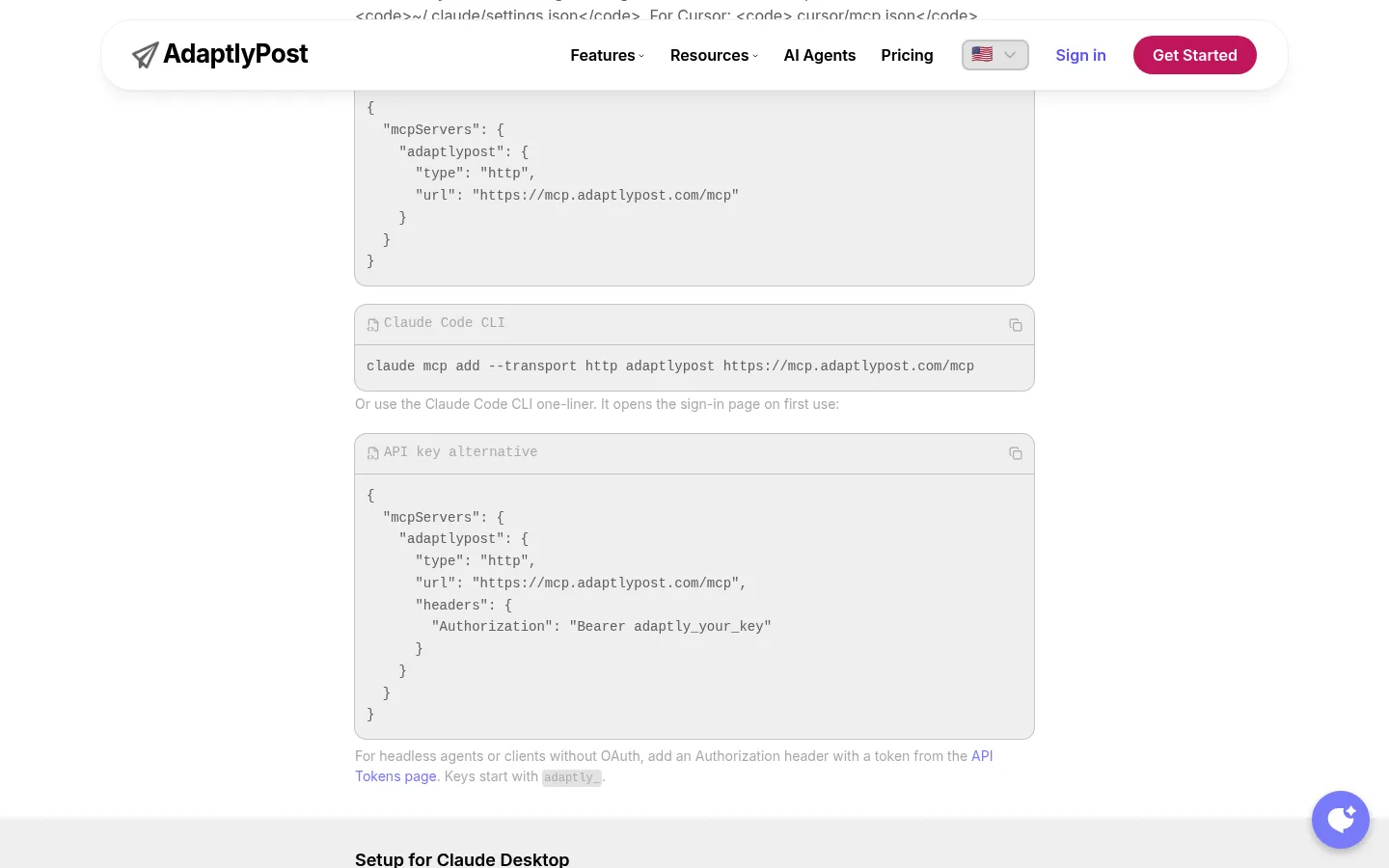
adaptly_.What does Muse do on its VM once it has the spec?
Muse fetches the spec, writes client code inside its own runtime container, calls the read endpoints, reports what it found, and saves the result as a reusable skill that outlives the conversation. The AdaptlyPost spec is OpenAPI 3.0.3, it covers 34 REST paths across 41 operations, and it returned 200 without a token when I fetched it on 13 October 2026.
The network path explains the prompts you will see. Every outbound request from the VM passes through Sentinel, the only component allowed to authorise a connector action or an egress request, and it inspects each one at layer 4 and layer 7. When Sentinel decides an action needs you, it creates a pending approval and execution stops until you answer, in the client UI rather than in the conversation. The activity log gives a chronological record of the actions Muse has taken and the permissions you have given it.

Where does the API token go, and why never in the chat?
The AdaptlyPost API token goes into Muse's secure credential prompt, a separate input outside the conversation, and never into a chat message. Meta stores credentials for connected services in what it calls the Secure Credentials Store, and its engineering post is specific about where that lives: "they're stored in a separate isolated container in your VM, not in other Meta services."

AdaptlyPost
Start Your 7-Day Free Trial
All-platform analytics
Social Inbox
AI-powered assistant
The mechanism underneath is why the instruction matters rather than being hygiene theatre. Code inside the agent's runtime only ever handles a surrogate token. Meta's sentence: "After the concrete network request is authorized, Sentinel will replace any surrogate tokens with the real credential, obtained from authd, at the network boundary." A model that never holds your real key cannot be talked into printing it. A token typed into chat is conversation content from that moment on.
Bearer tokens and API-key headers fit this flow directly, which is why an adaptly_ token suits Muse. Parallel writes that Muse's custom connector flow is built on keys and headers, and that in its experience with other agents, OAuth-only remote servers add friction. Create the token at adaptlypost.com/api-tokens and paste it once, into the credential prompt.
- Needs your dashboard login
- Breaks the week a button moves
- Failures read as "the page did not load"
- No per-platform error to retry against
- Never sees your AdaptlyPost password
- The contract is a published OpenAPI document, not the DOM
- One call schedules to fourteen networks
- Results come back per platform, with a retry endpoint
- Revoke the token and the next call returns 401
What can the connector do once it is built?
The connector lists your accounts, uploads media, creates immediate, scheduled and draft posts, bulk-schedules 1 to 100 posts in one call, reads per-platform results and retries only what failed. Eight of the spec's 34 paths carry the posting workflow.
| Call | What it does | When Muse uses it |
|---|---|---|
GET /social-accounts | Lists connected accounts and connection IDs | First call of any session |
POST /upload-urls | Returns presigned upload URLs for media | Before any image or video post |
POST /social-posts | Creates a post: immediate, scheduled or draft | The main one |
POST /social-posts/bulk | Schedules 1 to 100 posts in one call | Filling a week of content |
GET /social-posts/{id}/results | Per-platform publishing outcome | After anything goes out |
POST /social-posts/{id}/retry | Retries only the platforms that failed | When one network rejects a post |
GET /analytics/overview | Views, likes, comments, shares, followers, engagement rate | When you ask how last week went |
POST /ai/captions | Generates caption variants | When you hand Muse a bare topic |
The fourteen networks are Instagram, TikTok, YouTube, X, Facebook, LinkedIn, Pinterest, Threads, Bluesky, Mastodon, Telegram, Google Business Profile, Tumblr and WordPress. The base URL is https://post.adaptlypost.com/post/api/v1, and the whole contract reads without an account. That is the point: the thing Meta declines to review is a document you can open yourself.
What will the connector not do?
A custom connector will not reach anything on your own machine, will not be reviewed by anyone, and on Parallel's testing does not get the privilege separation Meta gives its built-in connectors. State those three plainly before you build one.
Parallel's finding on isolation is absent from Meta's own pages, so take it as a third-party result rather than documentation: "Custom connector code runs inside Muse's own runtime cell, which does not get the extra privilege separation Meta applies to built-in connectors." Meta documents privilege-separated workers for built-in connectors and says nothing either way about custom ones. Two protections carry over, on Parallel's account: Sentinel still governs every outbound request, and the code still sees only a surrogate credential.
The documentation gaps deserve naming too. As of 20 September 2026 Meta publishes no answer for what happens when your API returns 429 to Muse, what timeout it enforces on a slow endpoint, or whether a saved skill survives an endpoint change. There is also no public API for driving your own Muse from outside, so none of this is scriptable across a team. Each person rebuilds their own, and Meta's in-product warning covers every copy: "Muse may take unexpected actions. Monitor it carefully."
What does it cost in Muse tokens and AdaptlyPost plan terms?
Muse is free until you hit a weekly usage limit, and its paid tiers are Power at USD 20 per month with 500 million Muse tokens per week and Max at USD 100 per month with 3 billion. Meta meters usage in Muse tokens weekly rather than per message or per task, and Parallel reports that custom connectors draw on that same meter with no separate charge.
The free weekly figure people quote, 100 million tokens, traces to a Mark Zuckerberg Threads post reported by Gizmodo on 8 September 2026 rather than to any help centre article, so treat it as a founder's number with a date on it. For scale, Gizmodo's reviewer spent 11 percent of a free allowance in one launch-day session of drawings, games and animations. A REST connector is a far smaller workload.
On the AdaptlyPost side, Creator is $19 a month for 30 social accounts, Pro is $39 for 60 and Enterprise is $89 for 100, every plan includes API access and a 7-day free trial. You need a token, not a specific tier, so the connector works on the cheapest plan and on the trial.
How do I revoke it?
Revoking the adaptly_ token at adaptlypost.com/api-tokens cuts Muse off immediately, because every call it makes then returns 401 and publishing stops. That kill switch sits entirely on your side of the relationship and leaves your social account connections untouched.
On Meta's side, connectors are listed under Settings then Connectors and can be disconnected at any time, which stops data exchange. Meta documents that path for connectors chosen from its list and does not document removing a custom connector Muse built for you, so as of 20 September 2026 the token revocation is the part with a guaranteed outcome. Meta also says disconnecting does not erase what Muse already learned, and that resetting Muse deletes all your data in it.
Training Meta's models on your Muse interactions is on by default, sits under Settings in data controls as "help improve our AI models", and can be switched off retroactively.
Frequently Asked Questions
Does Meta Muse support MCP?
The Muse consumer agent has no documented MCP surface as of 20 September 2026. Parallel's hands-on test found no "add MCP server" setting, and Meta's help centre articles for the consumer agent never mention the protocol. Meta documents MCP for Muse Code, its separate terminal coding agent, which is a different product with the same brand.
AdaptlyPost
Start Your 7-Day Free Trial
All-platform analytics
Social Inbox
AI-powered assistant
Does Muse publish without asking me?
Meta's default, in Meta's words, is that Muse "will not take many important actions, such as sending an email," without approval, and the Connectors permission setting "Ask for some actions" makes Muse ask before every write action and important read actions. Under Settings then Permissions, that control also offers "Always ask". Keep per-post approval for the first week, then relax it once you have seen what Muse calls a finished caption.
Can Muse reach an API running on my own machine?
Muse cannot reach an API or an MCP server on your laptop, because the agent runs on a virtual machine in Meta's cloud rather than on your network. Any service Muse calls has to be reachable over the public internet. AdaptlyPost's API and spec are both hosted, so nothing runs locally.
Does building a custom connector cost extra?
Parallel reports that custom connectors draw on the same weekly Muse token allowance as everything else the agent does, with no separate charge. Meta's connectors help article never mentions tokens, usage or limits. On AdaptlyPost, API access is included on Creator, Pro and Enterprise.
Who can use Muse right now?
Muse is available in the United States, and Meta's @Muse account announced Canada on iOS and the web in the week of 18 September 2026, with Android pending. Subscribers must be 18 or the age of majority in their country and must log in with a Meta account. Meta calls Muse and its subscriptions limited testing, so the list moves.
What happens when one network rejects a post?
GET /social-posts/{id}/results returns the outcome per platform, so a post that succeeds on LinkedIn and fails on TikTok shows exactly that. POST /social-posts/{id}/retry takes an optional platformIds array of the IDs from that results call or platform names such as TIKTOK, and with no array it retries every failed entry, so the ones that already published stay untouched. Tell Muse to read results after every publish rather than retrying blind.
Is a Meta Muse custom connector safe to use?
Meta says it does not review custom connectors or how they use your information, so the checking is on you. Your token sits in the Secure Credentials Store, and the code in Muse's runtime only handles a surrogate credential. Parallel's testing found that custom connector code lacks the extra privilege separation built-in connectors get. Revoking the adaptly_ token cuts access at once.
Which social networks can Muse post to through AdaptlyPost?
Muse can reach fourteen: Instagram, TikTok, YouTube, X, Facebook, LinkedIn, Pinterest, Threads, Bluesky, Mastodon, Telegram, Google Business Profile, Tumblr and WordPress. One call to POST /social-posts schedules to them, and results come back per platform. Meta documents no publishing action of its own for its three networks, so the scheduler covers the gap.
Can I use the AdaptlyPost MCP server with Muse?
Not as of 20 September 2026. AdaptlyPost runs a hosted MCP server at https://mcp.adaptlypost.com/mcp with 31 tools, but Parallel found no MCP setting in Muse, so Muse takes the REST route through the OpenAPI spec. Agents that do speak MCP can use the server directly.
How much does Meta Muse cost?
Muse is free until you hit a weekly usage limit. Power is USD 20 per month with 500 million Muse tokens per week, and Max is USD 100 per month with 3 billion. Parallel reports that custom connectors draw on the same meter.
OpenAI's always-on agent reaches the same twelve networks through an OpenAI dots plugin for social media posting, and Cue, the Manus app, through a Manus Cue connector for social media posting.
Create an AdaptlyPost API token and hand Muse the spec, or read the agent setup brief first. If your agent does speak MCP, the hosted MCP server is the shorter path, and a Grok bot template covers the same fourteen networks.
Sources: Meta's Muse connectors help article, Meta's safety engineering post, Meta's Muse subscriptions page, Parallel's custom integrations write-up (14 September 2026), and the AdaptlyPost OpenAPI spec. Checked 20 September 2026.
Put this into practice with AdaptlyPost
Was This Article Helpful?
Let us know what you think!
See us more often in Google
One click marks AdaptlyPost as a preferred source, so our articles sit higher in your Top Stories, AI Mode, and AI Overviews.
Before you go...
AdaptlyPost
Schedule your content across all platforms
Manage all your social media accounts in one place with AdaptlyPost.
All-platform analytics
Social Inbox
AI-powered assistant
Related Articles
How to Set Up a Manus Cue Connector for Social Media Posting
Cue agents get their own email and phone, so a Manus Cue connector for social media posting starts with drafts. Server URL, Bearer token, first call.
Publish to Pages With a Meta Muse Connector for Facebook Posting
Facebook Pages are addressed by pageId, so a Meta Muse connector for Facebook posting reads the IDs from the API first. What to paste and where the token goes.
Why You Still Need a Meta Muse Connector for Instagram Posting
Muse links Instagram automatically but documents no publishing action, so a Meta Muse connector for Instagram posting adds postType, scheduling and retries.