TL;DR, Quick Answer
7 min readTo post to social media from Boost.space AgentOS, open Connections, click Add MCP server, paste https://mcp.adaptlypost.com/mcp and sign in with your AdaptlyPost account. Your AgentOS agents can then list your connected accounts, check and draft posts, schedule and publish on 14 platforms, read analytics and reply to comments. Give an agent an AdaptlyPost API key with the Contributor role if it should only write drafts.
Any Boost.space AgentOS social media workflow starts the moment an agent can reach your accounts, and AgentOS does not ship a social media scheduler of its own. It runs AI agents for business roles, connects them to the apps your team uses, and lets you chat with them. AdaptlyPost adds the part it is missing: the connections to Instagram, LinkedIn, TikTok and eleven other networks, and the tools to post there.
The two connect through the AdaptlyPost MCP server. AgentOS can add any MCP server that is reachable over HTTPS, and AdaptlyPost hosts one at https://mcp.adaptlypost.com/mcp. One URL, one sign-in, and every agent you allow can draft, schedule and publish.
The short version: connect your social accounts in AdaptlyPost, then in AgentOS open Connections, click Add MCP server, paste https://mcp.adaptlypost.com/mcp and sign in. Ask your agent to list your AdaptlyPost accounts. If it lists them, ask it for a draft.
What is Boost.space AgentOS?
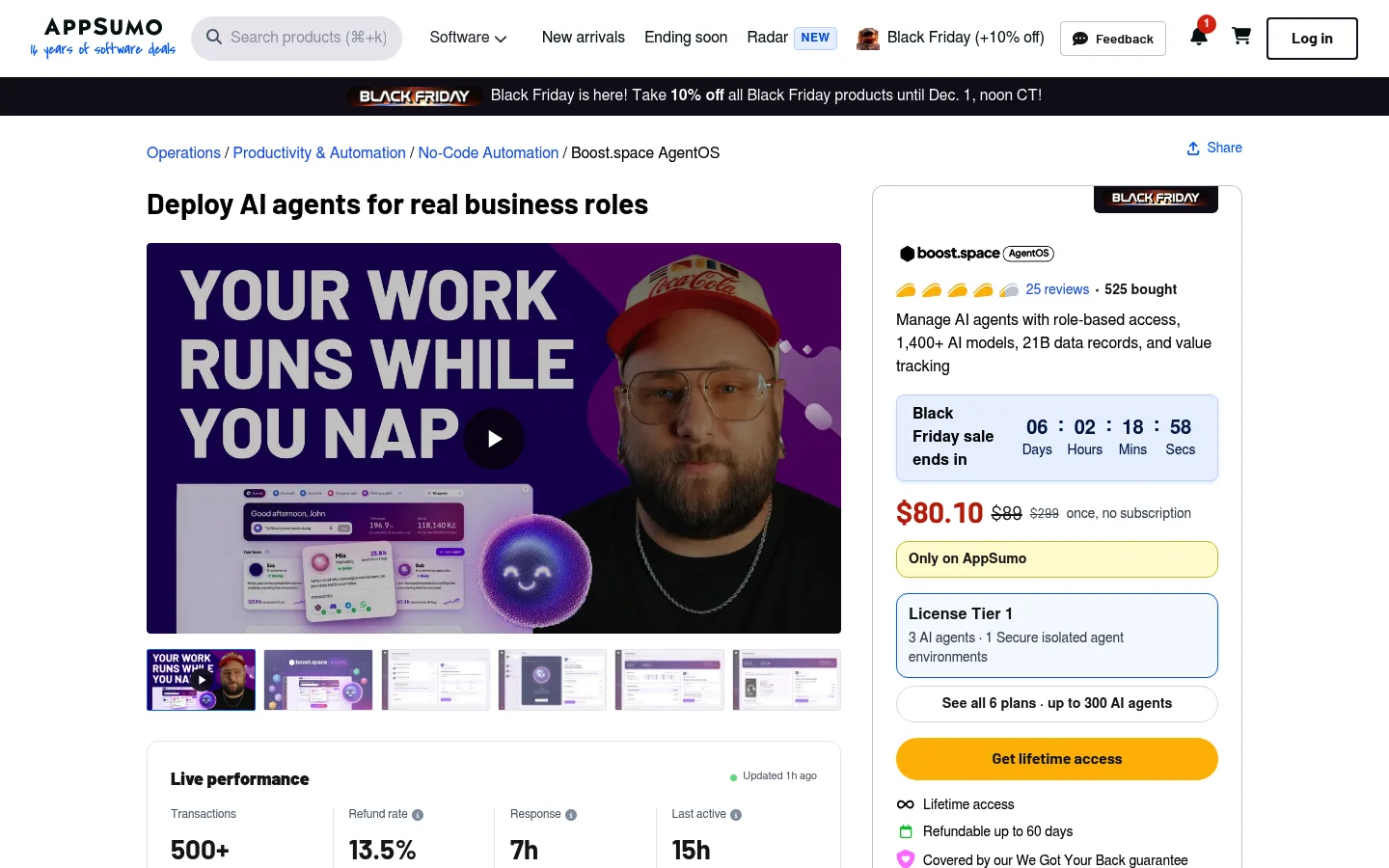
Boost.space AgentOS is a platform for running AI agents that do real business roles, made by Boost.space in Prague. Each agent gets its own access to the apps it works with, with read or write permissions set per agent, and you hand it work by chatting with it.
The AgentOS listing on AppSumo names the parts: per-agent secure access, an assistant called Boosty that takes voice or text, skills and ACT automations, an AI wallet with 1,400+ models, and value tracking that shows the time and money each agent saves. AgentOS connects to 1,500+ apps and lets you chat with agents in Slack, Microsoft Teams and WhatsApp.
Why connect AdaptlyPost to AgentOS?
You connect AdaptlyPost to AgentOS so your agents can publish to social media without holding a password or token for each network. AdaptlyPost keeps the OAuth connection to every platform. The agent talks to AdaptlyPost, and AdaptlyPost publishes.
That split matters for an agent that runs while nobody watches. A Boost.space agent with write access to Instagram directly could post anything. An agent connected through AdaptlyPost works inside the role its key or sign-in carries, every post shows up in the AdaptlyPost calendar, and a failed post shows which platform refused it.
AdaptlyPost publishes to 14 platforms: Instagram, TikTok, YouTube, X, LinkedIn, Facebook, Pinterest, Threads, Bluesky, Mastodon, Telegram, Google Business Profile, Tumblr and WordPress.
How do you add the AdaptlyPost MCP server to AgentOS?
You add the AdaptlyPost MCP server to AgentOS from the Connections page, with the server URL and a sign-in. The AgentOS guide to MCP servers describes the same form.
- Connect your social accounts in AdaptlyPost first. The agent can only post to accounts that already exist there.
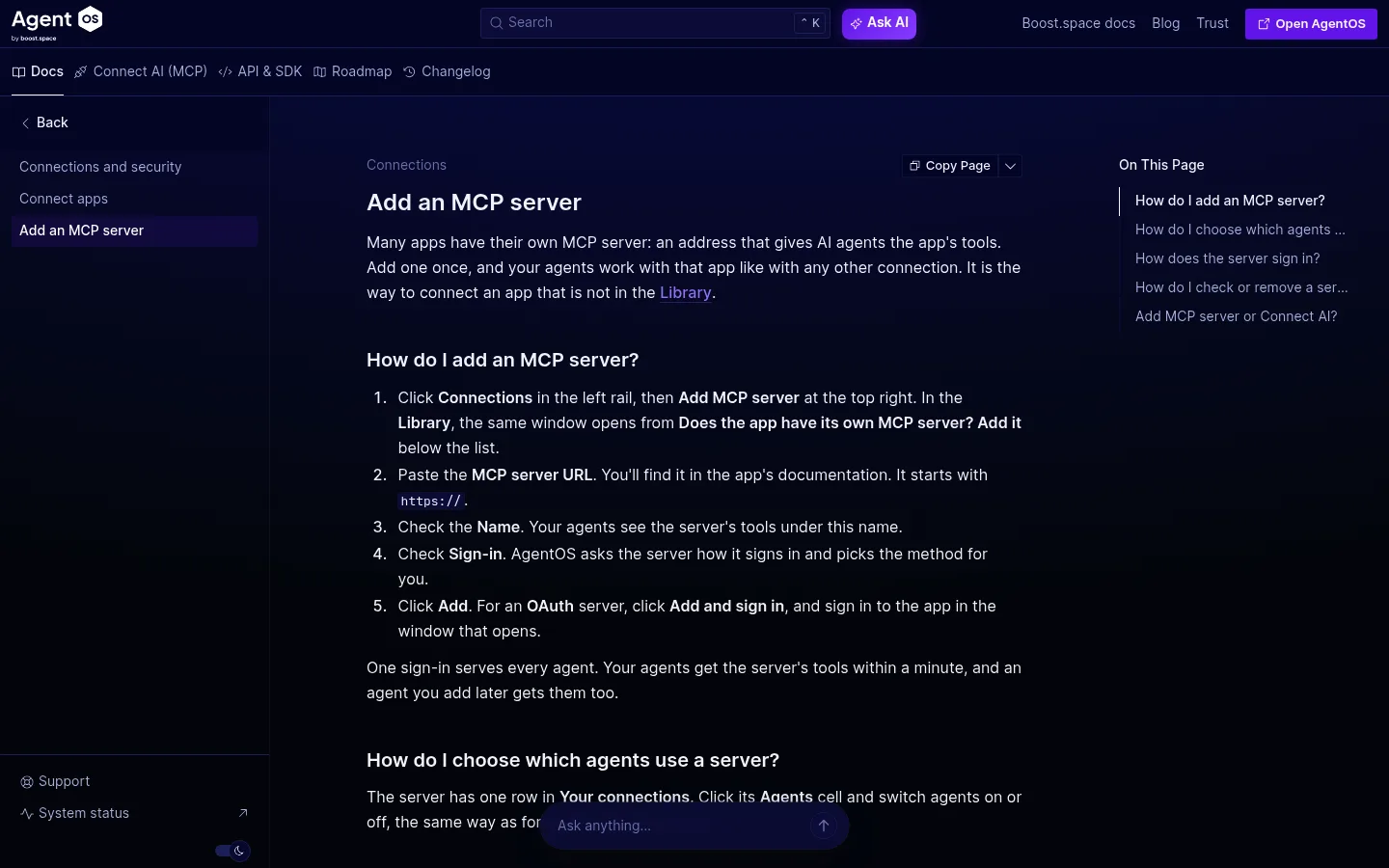
- In AgentOS, click Connections in the left rail, then Add MCP server at the top right.
- Paste
https://mcp.adaptlypost.com/mcpinto MCP server URL. - Check Name. Your agents see the tools under this name, so keep it as AdaptlyPost.
- Check Sign-in. AgentOS asks the server how it signs in and picks the method. AdaptlyPost supports OAuth, so click Add and sign in and log in with your AdaptlyPost account in the window that opens.
- Find the server under Your connections and click Test.
- In the same row, open the Agents cell and switch on only the agents that should post.
An OAuth sign-in reaches every workspace your AdaptlyPost user belongs to. The agent calls list_workspaces and passes the workspace it needs, so one connection can serve several brands or clients.
How do you connect with an API key instead?
You connect with an API key when the agent should act in one workspace with a fixed role. Create the key at app.adaptlypost.com/api-tokens. It starts with adaptly_.
In the Add MCP server form, set Sign-in to API key and paste the key. AgentOS sends it as Authorization: Bearer, which is the header AdaptlyPost reads, so you do not need Send the key in another header.
Pick the role on purpose. A Contributor key can only save drafts and upload media, which suits an agent you are still testing. An Editor or Admin key can schedule and publish. A Viewer key can only read, which is enough for an agent that writes analytics reports.

AdaptlyPost
All-platform analytics
Social Inbox
AI-powered assistant
What can an AgentOS agent do on social media through AdaptlyPost?
An AgentOS agent connected to AdaptlyPost can run the whole posting loop: check a post, create it, read the results and react. Here is what that covers by task:
| Task | AdaptlyPost tools the agent calls |
|---|---|
| See where it can post | list_workspaces, list_accounts |
| Write and check a post | generate_caption, refine_caption, validate_post |
| Publish, schedule or draft | create_post, publish_draft, bulk_schedule_posts |
| Fix a failed post | list_post_results, retry_failed_platforms |
| Report on results | get_analytics_overview, list_top_posts |
| Answer the audience | list_inbox_comments, reply_to_inbox_comment, send_inbox_message |
| Upload media | get_upload_urls, upload_media |
The tools also cover recurring posts, RSS feeds, webhooks and AI images. The agent sees all of them once the server is connected, and AgentOS decides which ones each agent may use.

What should you ask the agent first?
Ask the agent to list your AdaptlyPost accounts first. If it returns them, the connection works and the agent knows which account IDs to use.
Then try these, in this order:
- "List my connected AdaptlyPost accounts and their platforms."
- "Write a LinkedIn post about our new pricing page and save it as a draft in AdaptlyPost."
- "Check this post for Instagram and X and tell me what would block it."
- "Schedule the draft for Tuesday at 9:00 Europe/Berlin."
- "Which of last week's posts had the most comments? Draft replies to the unanswered ones."
The draft step matters. A draft waits in the AdaptlyPost calendar, where a person can read it before it goes out.

How do you keep an agent from posting something wrong?
You keep an AgentOS agent from posting something wrong with three limits that stack: the AdaptlyPost role, the AgentOS permissions and a draft-first habit.
- Start with a Contributor key. The agent can write drafts and nothing more. Switch to an Editor key when a week of drafts looks right.
- Set the agent's permissions in AgentOS. Give the social media agent write access to AdaptlyPost and keep other agents read-only.
- Ask for
validate_postbeforecreate_post. It returns what would stop the post on each account without creating anything. - Use AgentOS approval points and history. AgentOS can pause for approval at the points you set, and its execution history shows which agent called which tool and when.
How much does Boost.space AgentOS cost?
Boost.space AgentOS sells as a lifetime deal on AppSumo, paid once with no subscription. Tier 1 costs $89 for 3 AI agents and 1 team seat, and Tier 4 costs $609 for 40 agents and 25 seats. AppSumo lists six plans in total, up to 300 agents, and these are the first four:
| AppSumo tier | Price | AI agents | Team seats | ACT operations per month | Database records |
|---|---|---|---|---|---|
| Tier 1 | $89 | 3 | 1 | 10,000 | 10,000 |
| Tier 2 | $189 | 8 | 3 | 20,000 | 25,000 |
| Tier 3 | $359 | 20 | 10 | 50,000 | 75,000 |
| Tier 4 | $609 | 40 | 25 | 100,000 | 200,000 |
The deal is for new Boost.space users, and AppSumo refunds it within 60 days. AdaptlyPost is billed on its own, and its MCP server is included on every plan.
Should you use AgentOS, Make or another agent?
Use AgentOS when you want several agents with separate permissions, chatted with in Slack or Teams, and one bill for the AI models behind them. AdaptlyPost connects to other tools in the same way, all listed on the API and AI agents page.
- Claude, ChatGPT and Cursor use the same MCP server. The list of social media MCP servers compares ours with the others.
- Hermes Agent installs it as a plugin, as the Hermes Agent social media guide shows.
- Make and Zapier suit fixed workflows with no model deciding what to post. The Make.com social media automation guide covers the AdaptlyPost app on Make.
Frequently Asked Questions
Does Boost.space AgentOS have a built-in AdaptlyPost app?
Boost.space AgentOS does not list AdaptlyPost in its app catalog. You add AdaptlyPost as an MCP server from Connections > Add MCP server, with the URL https://mcp.adaptlypost.com/mcp, and every agent you allow can use its tools.
Which sign-in should you pick for AdaptlyPost in AgentOS?
Pick OAuth when one connection should reach all your AdaptlyPost workspaces, and an API key when the agent should stay in one workspace with a fixed role. AgentOS detects that AdaptlyPost supports OAuth and offers Add and sign in. A key goes in the API key field and travels as a Bearer token.
Can an AgentOS agent publish without asking you?
An AgentOS agent publishes without asking you only if its AdaptlyPost key or sign-in can publish and its AgentOS permissions allow writes. Give it a Contributor key and it can only save drafts, which a person then publishes from the AdaptlyPost calendar.
Which social networks can AgentOS post to through AdaptlyPost?
AgentOS posts through AdaptlyPost to 14 platforms: Instagram, TikTok, YouTube, X, LinkedIn, Facebook, Pinterest, Threads, Bluesky, Mastodon, Telegram, Google Business Profile, Tumblr and WordPress. The agent can only use the accounts you connected in AdaptlyPost.
AdaptlyPost
All-platform analytics
Social Inbox
AI-powered assistant
Do you need a paid AdaptlyPost plan for the MCP server?
The AdaptlyPost MCP server is included on every AdaptlyPost plan, and it acts on the accounts and limits of that plan. The AgentOS deal on AppSumo does not include AdaptlyPost.
What happens when a post from an AgentOS agent fails?
A post that fails shows as failed or partially failed in AdaptlyPost. The agent can call list_post_results to see which platform refused it and why, and retry_failed_platforms to send it again to those platforms only.
Can one AgentOS connection serve several brands or clients?
Yes, with an OAuth sign-in. It reaches every workspace your AdaptlyPost user belongs to, and the agent calls list_workspaces and passes the workspace it needs. An API key keeps the agent in one workspace with a fixed role.
Can an AgentOS agent reply to comments on my posts?
An AgentOS agent can read comments with list_inbox_comments and answer them with reply_to_inbox_comment. It can also send messages with send_inbox_message. A reply goes out at once, so ask the agent to show you the replies in the chat first if you want to read them.
Which AdaptlyPost API key role should an AgentOS agent have?
A Contributor key suits an agent you are still testing, because it can only save drafts and upload media. An Editor or Admin key can schedule and publish. A Viewer key can only read, which is enough for an agent that writes analytics reports.
How do you check that AgentOS reached AdaptlyPost?
Find the server under Your connections and click Test. Then open the Agents cell in the same row, switch on the agent that should post, and ask it to list your AdaptlyPost accounts. If the accounts come back, the connection works.
Put this into practice with AdaptlyPost
Was This Article Helpful?
Let us know what you think!
See us more often in Google
One click marks AdaptlyPost as a preferred source, so our articles sit higher in your Top Stories, AI Mode, and AI Overviews.
Before you go...
AdaptlyPost
Schedule your content across all platforms
Manage all your social media accounts in one place with AdaptlyPost.
All-platform analytics
Social Inbox
AI-powered assistant
Related Articles
How to Set Up Hermes Agent Social Media Posting With the AdaptlyPost Plugin
Set up Hermes Agent social media posting with the AdaptlyPost plugin: two commands, one OAuth sign-in, 14 platforms, and an approval prompt before every write.
How to Schedule Social Media Posts From ChatGPT With the AdaptlyPost Plugin
Schedule social media posts from ChatGPT on 11 networks: install the AdaptlyPost plugin, sign in once, and confirm each post before it goes out.
How to Build Make.com Social Media Automation With the AdaptlyPost App
Make.com social media automation with the verified AdaptlyPost app: one API key, 13 modules and 14 platforms, plus three scenarios you can copy today.