Ship Tweets From Your Backend With a Twitter Posting API
One authenticated POST to /social-posts is the entire Twitter posting API integration: send text, up to four images, or a video to your connected X account, publish immediately or queue it with scheduledAt and an IANA timezone.
The X Posting API Surface, in Full
REST over HTTPS at https://post.adaptlypost.com/post/api/v1, a bearer token, and a JSON body. The 280-character limit and the four-image ceiling are validated on our side, so a bad tweet fails with a 400 instead of a partial publish on X.
Post to All Your Platforms at Once
Share to Instagram, TikTok, YouTube, X, and more with one click. Each post auto-adapts to fit the platform.
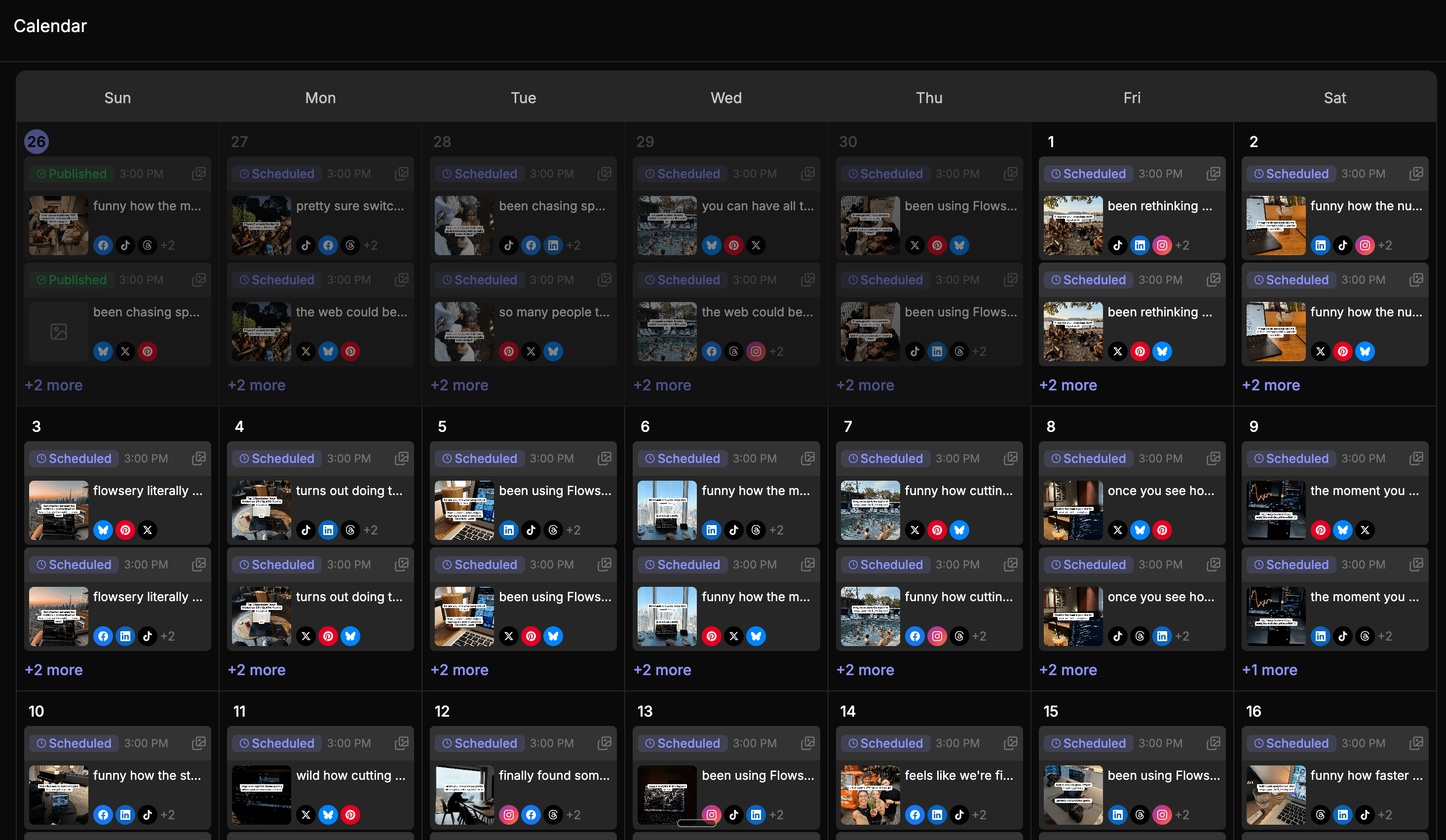
Visual Content Calendar
The AdaptlyPost calendar shows every draft, scheduled, and published post by day, so your posting slots stay filled.
Social Media Analytics in One Place
AdaptlyPost tracks views, likes, shares, and engagement for every connected account in one analytics dashboard.
API Access & OpenClaw Skill
Connect via API or let your OpenClaw AI agent manage posts for you. Automate social media with natural language commands.
AI Image Generator for Social Media
Generate scroll-stopping images in seconds. Just describe your vision and let AI bring it to life.
AI Caption Generator for Every Platform
The AdaptlyPost AI copilot writes captions, rewrites them per platform, and adds hashtags from a single prompt.
Social Media Content Planner
AdaptlyPost keeps drafts, scheduled posts, and published content in one queue, so you see what goes live and when.
Trusted by Creators and Teams
See how creators, marketers, agencies, and small businesses use AdaptlyPost to stay consistent and save hours every week.
Running 11 accounts across 8 platforms with almost zero friction
I am currently running 11 accounts spread across Facebook, Instagram, Threads, LinkedIn, Bluesky, YouTube, X, and TikTok, all connected and posting daily. Ease of use: 10/10. The learning curve is basically nonexistent. Scheduling posts across multiple platforms takes minutes instead of the hours it used to take me doing it manually. It has replaced at least two other subscriptions for me and I have zero regrets.
 jeremy8939
Simple, powerful and amazing support
It's easy to use, and connecting it with Claude lets me organize and distribute videos and images while staying true to my brand's style. What really stands out is the support: I told Taras I needed two new features, the ability to publish Instagram posts mixing images and videos, and to upload PDFs to LinkedIn via MCP, and he had both ready in just 3 hours. Fast, responsive, and truly amazing.
 destaca
My Honest Experience Running My Social Media with AdaptlyPost + Claude AI
Then the part that still feels a little crazy: I told Claude to generate the full posts including images and graphics and schedule everything through AdaptlyPost. I went to my content calendar expecting to babysit the process. It was already filled. 30 days of posts, text and visuals, scheduled and ready. The whole thing took about 10 minutes. I used to lose hours every week to this.
 basantkumar405
Finally, a tool that fits a terminal-first workflow (and top-tier support!)
I've tried several social media scheduling tools in the past, and none of them quite clicked with my workflow. Adaptly completely changed that.
 mayank09
Responsive developer and a client-friendly connect link that solves a real agency pain point
My favorite feature is the Shareable Connect Link. You can generate a link so a client can connect their own social accounts, with no dashboard access required. Getting non-technical clients to hand over access to their accounts has been a constant pain point for me, and this removes most of that friction. I send a link, they click through and authorize, and I'm done.
 automatexyz
Solid multi-account scheduler, we run 3 brands on it daily
We've been using AdaptlyPost to schedule Instagram, Facebook, LinkedIn (and Stories) across three brands. What I like most is that it stays out of the way once posts are queued. We schedule stills, carousels, and Reels/Stories in batches, review the calendar, and let it publish.
 Dacstyle
How It Works
Handle Twitter OAuth Once, in the Dashboard
There is no OAuth flow in the API - you connect X in the dashboard, then create a key under Settings > API Tokens. Every request carries Authorization: Bearer adaptly_..., and GET /social-accounts returns the connected X account id you pass in twitterConnectionIds. For white-label setups, POST /connect-links mints a link your own end user opens to connect their X account.
POST the Tweet To /Social-Posts
text, platforms, timezone and twitterConnectionIds are required on every call. X has no config object in the API - there is no twitterConfigs, so there is nothing per-platform to set: no polls, no quote posts, no replies, no first comment, no link-preview control. One X account per request is enforced with a 400, so posting the same tweet from two X accounts means two calls.
Read the X Result and Retry That Entry
The request body is checked synchronously at create time: text past 280 characters, more than four images, or two X accounts in one call return a 400 immediately and no post record is written. GET /social-posts/:id/results reports what happened after we accepted and dispatched the tweet - the X entry with status, publishedAt, and platformPostId, the native tweet id, never a permalink. When X itself refuses the post - duplicate text, a connection whose token was revoked, a video it rejects during its own processing - the reason lands in errorMessage, and POST /social-posts/:id/retry re-fires only that platformId. Every registered webhook endpoint receives all five events - post.published, post.failed, post.partially_failed, post.scheduled and account.unauthorized - with no per-event subscription to choose from.
Simple, Transparent Pricing
Choose the perfect plan for your needs
30 connected social accounts
Unlimited scheduled posts
Team collaboration
1 workspace
150 AI credits/month
AI Captions
AI Image Studio
API/MCP/CLI
Image, video & carousel posts
Direct Connector
Direct Plugin
Browser extensions
Works with
Most Popular
60 connected social accounts
Unlimited scheduled posts
3 team members
3 workspaces
400 AI credits/month
AI Captions
AI Image Studio
API/MCP/CLI
Image, video & carousel posts
Direct Connector
Direct Plugin
Browser extensions
Works with
100 connected social accounts
Unlimited scheduled posts
10 team members
10 workspaces
1000 AI credits/month
AI Captions
AI Image Studio
API/MCP/CLI
Image, video & carousel posts
Direct Connector
Direct Plugin
Browser extensions
Works with
Custom
Custom limits, white-label and priority support
Custom
Unlimited social accounts
Unlimited scheduled posts
Unlimited team members
Unlimited workspaces
Unlimited AI credits
AI Captions
AI Image Studio
API/MCP/CLI
Image, video & carousel posts
Direct Connector
Direct Plugin
Browser extensions
Works with
All plans include a 7-day free trial
Want to see the full feature comparison? View pricing page
What You Can Post to Twitter via the API
Text Tweets, Checked at 280 Characters
The full payload is text, platforms set to TWITTER, an IANA timezone, and twitterConnectionIds. Anything past 280 characters comes back as a 400 before the call reaches X - no silent truncation, and no automatic splitting, because reply chains are not supported anywhere in the API. One call is one tweet.
Up to Four Images per Tweet
Attach one to four image URLs. Four is X's hard ceiling, and a multi-image tweet is exactly that - several images in one post, not a native X carousel unit. POST /upload-urls accepts image/jpeg, image/png and image/webp only, so GIF, HEIC and AVIF files cannot be pushed through it.
One Video, up to 140 Seconds
MP4 or MOV, 512 MB maximum, one video per tweet. X itself will not take a video mixed with images, so keep the two apart. Unlike TikTok, X accepts mediaUrls on your own HTTPS host, so you can skip the upload step entirely - or push files through POST /upload-urls for presigned links that expire in an hour.
Publish Now, Schedule, Draft, or Bulk-Queue
Send scheduledAt with the timezone to queue a tweet, or saveAsDraft and fire POST /social-posts/:id/publish later. POST /social-posts/bulk takes 1-100 tweets in a single request, all sharing the same X connection, with scheduledAt required on every item. PATCH /social-posts/:id edits anything still unpublished.
Post Your First Tweet From Code
Connect X in the dashboard, create a key at Settings > API Tokens, and send one POST to /social-posts. The spec at /openapi.json needs no auth and imports straight into Make, n8n, or your own client generator.