
TL;DR, Quick Answer
5 min readA content calendar is a planning tool that organizes when and where content will be published. It brings structure, consistency, and strategic alignment to content marketing and social media efforts.
What Is a Content Calendar?
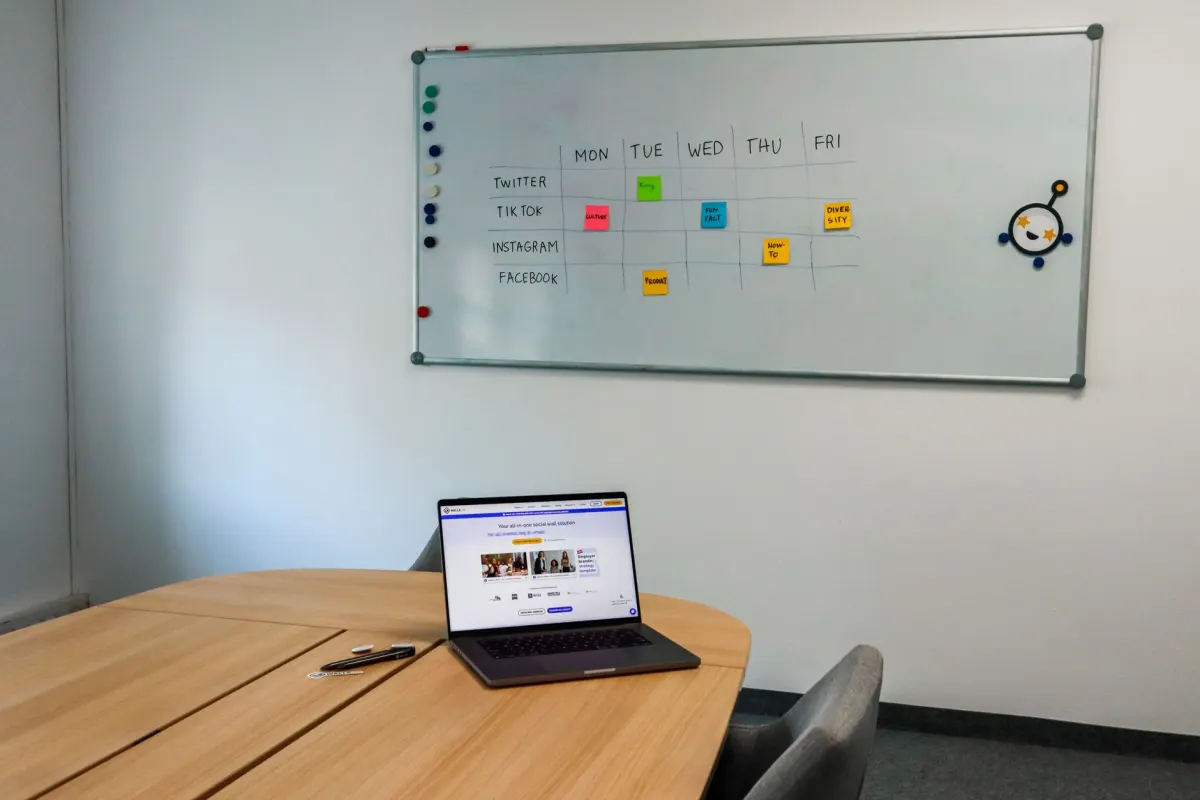
A content calendar, also called an editorial calendar, is a planning document or tool. It maps out what content will be published, when it will go live, and on which channels. It serves as the central reference point for content teams, ensuring everyone knows what is being created, who is responsible, and when deadlines fall.
Content calendars range from simple spreadsheets to sophisticated software platforms, but they all serve the same fundamental purpose: bringing order and intention to content production.
Why You Need a Content Calendar
Consistency
Publishing regularly is one of the most important factors for social media and content marketing success. A calendar makes it easy to maintain a steady cadence rather than posting sporadically.
Strategic Alignment
A calendar connects individual posts and articles to larger goals, campaigns, and themes. Without one, content is reactive rather than strategic.
Team Coordination
When multiple people contribute to content, a shared calendar prevents duplication, ensures coverage of all important topics, and keeps everyone working toward the same objectives.
Time Management
Planning content in advance eliminates the stress of last-minute creation. Batch-producing content based on the calendar is significantly more efficient than creating posts one at a time.
Performance Tracking
A calendar creates a record of what was published and when, making it easier to correlate content activity with performance metrics and business outcomes.
What to Include in a Content Calendar
| Element | Description |
|---|---|
| Publication date and time | When the content goes live |
| Platform / channel | Where the content will be published |
| Content type | Post format (image, video, carousel, story, article) |
| Topic / title | Subject matter and headline |
| Copy / caption | The text that accompanies the content |
| Visual assets | Links to images, videos, or design files |
| Status | Draft, in review, approved, scheduled, published |
| Author / owner | Who is responsible for creating the content |
| Campaign / theme | What larger initiative the content supports |
| Links / CTAs | Any URLs or calls to action included |
| Notes | Additional context, hashtags, or instructions |
How to Create a Content Calendar
Step 1: Audit Your Current Content
Review what you have been publishing across all channels. Identify patterns, gaps, and what has performed well. This baseline informs your calendar strategy.
Step 2: Define Your Content Pillars
Establish three to five core themes or topics that your content will revolve around. These pillars ensure variety while keeping content focused on your brand's expertise and audience interests.
Step 3: Set Your Publishing Frequency
Decide how often you will publish on each channel. Be realistic about your team's capacity. Consistent quality at a sustainable pace beats high volume that leads to burnout.
Step 4: Choose Your Tool
Select a tool that matches your team's size and workflow:
- Spreadsheets (Google Sheets, Excel): Simple, flexible, free. Best for small teams.
- Project management tools (Asana, Trello, Monday): Good for teams that need task tracking alongside scheduling.
- Dedicated content calendar tools: Purpose-built platforms with publishing integrations.
- Social media management platforms: Tools that combine calendar planning with scheduling and publishing capabilities.
Step 5: Map Out Key Dates
Add important dates to your calendar first: product launches, industry events, holidays, seasonal campaigns, and company milestones. These anchor dates shape the content around them.
Step 6: Fill in Content Slots
Working from your content pillars and key dates, assign specific content ideas to each slot in the calendar. Leave some flexibility for timely or reactive content.
Step 7: Build in Review Cycles
Schedule time for content review and approval before publication dates. This buffer prevents rushed publishing and maintains quality standards.

AdaptlyPost
Start Your 7-Day Free Trial
All-platform analytics
Social Inbox
AI-powered assistant

Content Calendar Best Practices
- Plan ahead but stay flexible: Build your calendar one to two months in advance while leaving room for timely, unplanned content.
- Review weekly: Hold a brief weekly review to assess upcoming content, address gaps, and make adjustments based on current events or performance data.
- Color-code by category: Visual organization helps you quickly spot imbalances in content mix or channel coverage.
- Include all channels: Your calendar should encompass social media, blog, email, and any other content channels for a complete view.
- Archive past content: Keep records of published content and its performance for reference when planning future calendars.
- Involve the whole team: Share the calendar with everyone who creates, reviews, or publishes content. Transparency improves coordination.
Common Content Calendar Mistakes
- Over-planning: Filling every slot months in advance leaves no room for spontaneity or responding to current events.
- Ignoring analytics: A calendar should evolve based on performance data. Do more of what works and less of what does not.
- Siloed calendars: Separate calendars for each platform create inconsistency. Use one unified calendar across all channels.
- No owner: Someone needs to be responsible for maintaining the calendar. Without ownership, it quickly becomes outdated.
Related Terms
- Content Planning: The strategic thinking that informs the calendar.
- Content Strategy: The overarching plan that the calendar executes.
- Content Scheduling: The act of setting specific publish times for calendar entries.
- Content Pillars: The thematic categories that structure calendar content.
Frequently Asked Questions
How far in advance should I plan my content calendar?
Most teams plan two to four weeks ahead for social media and one to three months ahead for blog and long-form content. The right horizon depends on your industry, team size, and how frequently your content needs to respond to current events.
What is the difference between a content calendar and a social media calendar?
A social media calendar focuses specifically on social platform publishing. A content calendar is broader, encompassing all content types across all channels. Ideally, social media planning is integrated into a comprehensive content calendar.
Should I include content ideas I have not finalized yet?
Yes. Marking tentative ideas with a "draft" or "idea" status keeps them visible for planning purposes. Just make sure to distinguish between confirmed and tentative entries.
How do I handle content that needs to be published on multiple platforms?
Create one calendar entry per platform so you can customize copy, visuals, and timing for each channel. Group related entries under the same campaign or theme for easy reference.
What is the difference between a content calendar and an editorial calendar?
A content calendar and an editorial calendar are the same thing. The post uses editorial calendar as another name for the same planning document. Both map what publishes, when, and on which channel.
How many content pillars should a brand have?
Most teams work from three to five content pillars. These are the core themes a brand's content revolves around. They keep output varied while staying focused on the brand's expertise and audience interests.
What tools can I use to build a content calendar?
Options range from simple spreadsheets like Google Sheets or Excel to project management tools like Asana, Trello, or Monday. Teams that want planning and publishing in one place can use dedicated content calendar tools or social media management platforms. The right choice depends on team size and how much task tracking you need alongside the calendar itself.
Why does batching content save time?
Batching means producing multiple pieces of content in one sitting instead of creating posts one at a time. A calendar makes this possible because topics and deadlines are already mapped out ahead of time. Working this way is more efficient and removes the stress of last-minute creation.
How often should a team review its content calendar?
A brief weekly review keeps the calendar useful. During that session the team checks upcoming content, addresses gaps, and adjusts for current events or performance data. Skipping this step is how a calendar drifts out of date.
What happens if no one owns the content calendar?
Without an owner, a content calendar quickly becomes outdated. Nobody keeps entries current, so statuses and dates stop reflecting reality. The team stops trusting it and publishing slides back into sporadic, unplanned posting.
Plan Your Content with Confidence
A well-maintained content calendar is the foundation of consistent, strategic social media publishing. AdaptlyPost provides the tools you need to plan, schedule, and manage your content calendar across all platforms from one central dashboard.
Put this into practice with AdaptlyPost
Was This Article Helpful?
Let us know what you think!
See us more often in Google
One click marks AdaptlyPost as a preferred source, so our articles sit higher in your Top Stories, AI Mode, and AI Overviews.
Before you go...
AdaptlyPost
Schedule your content across all platforms
Manage all your social media accounts in one place with AdaptlyPost.
All-platform analytics
Social Inbox
AI-powered assistant
Related Glossary Terms
A Practical Answer - How Does Content Curation Work?
Filling the calendar is the least of it. How content curation builds authority, where to find material worth sharing, and how to credit it properly.
Explained Clearly - Content Repurposing Process
A single post can become a carousel, a thread, a newsletter, and a video. Where the content repurposing process starts, and which formats travel well.
Explained Clearly - Schedule Posts
Preparing content ahead and letting it publish itself. Why teams schedule posts, the timing gains, and the habits that keep a queue from going stale.
Related Articles
Explained Clearly - Batching Means
Context switching is the real cost. What batching means in practice, which tasks group well together, and how one session can cover a whole month.
Explained Clearly - Canned Responses Meaning
A canned answer saves hours and costs goodwill the moment it shows. How to write templates worth reusing, where placeholders go, and when to type it out.
How Content Amplification Services Extend Reach
Great content still needs distribution. Which channels content amplification services use, what they cost, and when to run the work in-house instead.